AI Singing Voice and Song Cover Guide
This guide explains how to build an AI singing voice and use it to generate song covers with OpenMusic.
Introduction
OpenMusic allows you to train a personalized AI voice model using your own recordings, then apply that voice to create song covers.
This makes it possible to perform songs in your own vocal style—or other trained voices—without professional studio gear or deep production knowledge.
Getting Started
Train your voice model
Visit the AI Singing Voice Generator page. Enter a name for your voice model and upload your vocal recordings to begin training.
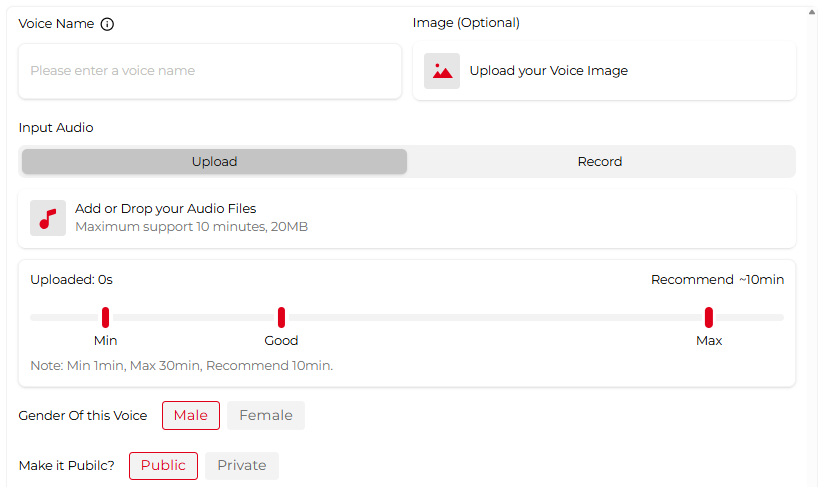
You can upload existing audio files or record directly in your browser. Supported recordings range from 1 to 30 minutes.
For best results, provide at least 10 minutes of clean vocal audio with no background noise, effects, or music.
After uploading, choose the vocal gender and decide whether the model should be public or private. Public models may appear in the shared voice library for other users to explore.
Generate a song cover
Open the AI Song Cover Generator. You will see two options: “My Voice Model” and “Library”.
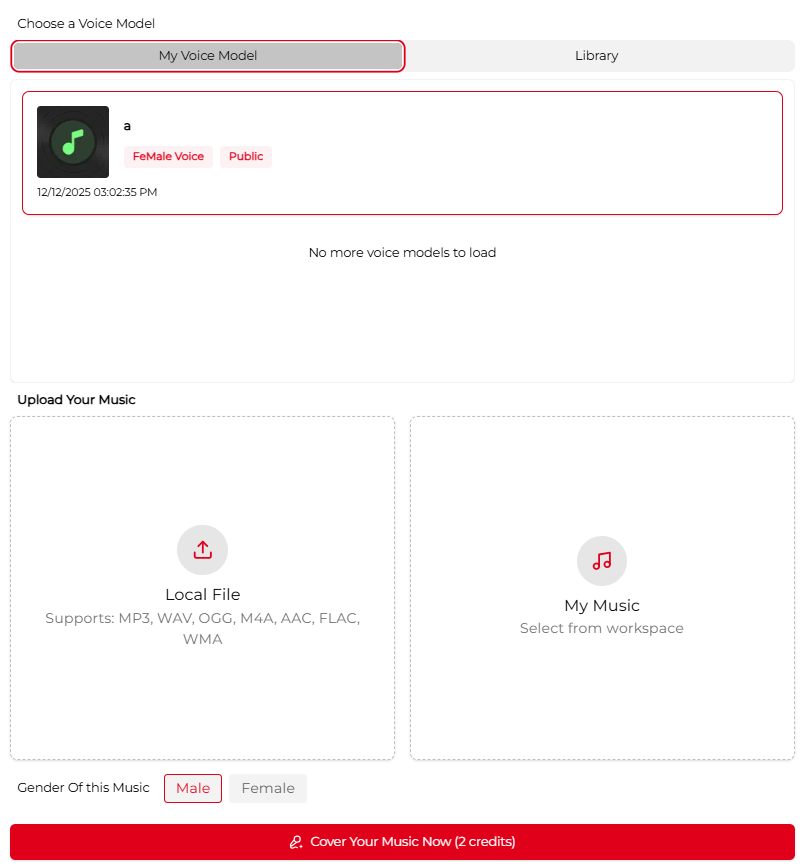
- Select one of your trained voice models under “My Voice Model”, or choose a ready-made option from the Library.
- Upload the song you want to cover, or select a track from My Music in your workspace.
- Set the vocal gender to match the desired singing style.
- Click the Cover button and wait about 1–2 minutes for processing.
Once finished, preview your cover and download the final audio.