Music AI Tools by Task
Every way AI can help you make a song. Music AI is not one thing. It can compose a full song from a sentence, write lyrics, separate a vocal from a mix, polish a finished track or turn a recording into MIDI notes. Each of those is a different job, and each works best with a tool built for it.
Below, each common music task is matched to the music AI tool on OpenMusic that handles it, so you can go straight to the right place. Most people start with the OpenMusic AI Music Generator, then reach for the other tools as a song takes shape.
What Music AI Can Do, Task by Task
If you are looking for an AI that can make music for one specific job, no single tool does everything well, so OpenMusic, an AI that creates music in several ways, gives each task its own page. Find the job you have in mind and follow the link.
Generate a song or instrumental
Describe a song in words, paste your own lyrics or upload a reference clip, and get a full track. Start in the AI Music Generator.
Write lyrics
Turn a theme or a mood into verses and a chorus you can edit, then bring them back to the generator. Try the AI Lyrics Generator.
Split a track into stems
Separate a mixed song into individual parts for remixing, practice or sampling with the AI Stem Splitter.
Remove vocals
Pull the vocal out of a song to make a karaoke or backing track with the AI Vocal Remover.
Master a finished mix
Give a finished track a final polish before you share it, using AI Music Mastering.
Work with MIDI
Edit notes in the AI MIDI Editor, or convert a recording into notes with AI Audio to MIDI.
The Generator Is Where Most Songs Begin
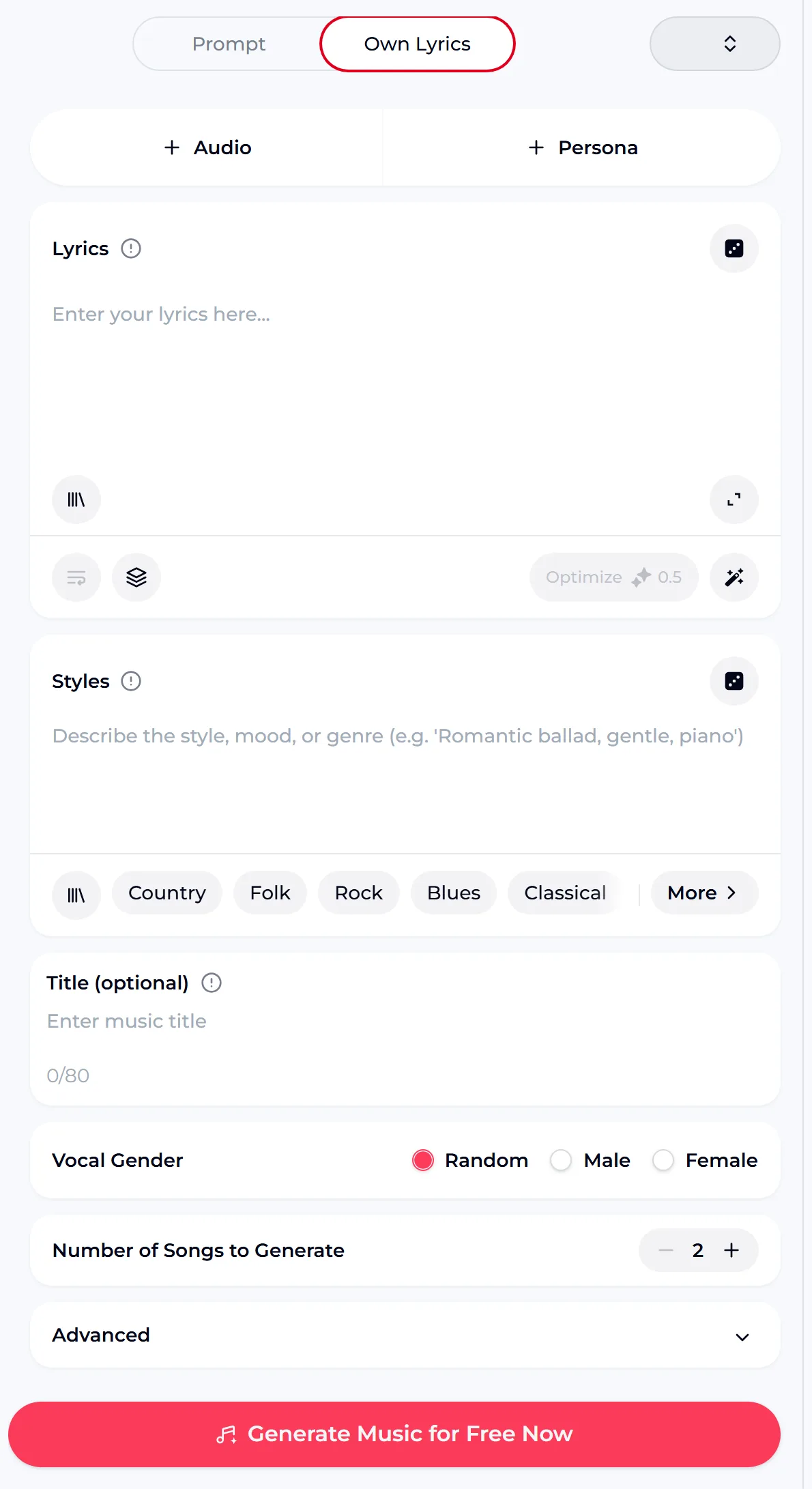
If you are new to music AI, the generator is the easiest way in. You describe what you want or paste lyrics you wrote, choose a vocal gender if the song has singing, and generate. The credit cost is shown on the generate button.
- Prompt mode: describe genre, mood, instruments and pace in a sentence
- Own Lyrics mode: your words become the sung vocal
- Audio mode: start from a reference clip you upload
- Instrumental Only: music with no vocal, for video or study
- It does not edit an existing recording note by note; that is a job for the MIDI tools
Where Musicians Draw the Line With AI
"Where do you actually use AI in your creative process — and where do you draw the line?"— a musician asking on r/WeAreTheMusicMakers

How much music AI to use is different for everyone. One songwriter in r/SunoAI put their own split simply: "I write my own lyrics and use Suno for music and vocals." Others use music AI only for one step, such as separating stems or drafting a demo. The music AI tools below let you choose how much to hand over.
The lyricist
Writes every word, then uses Own Lyrics mode to hear a melody and arrangement around them.
The producer
Makes beats by hand, and uses the stem splitter or MIDI tools for one specific step.
The creator
Needs an instrumental for a video or podcast and generates one with music AI from a short description.
Free Music AI: What the Free Plan Covers
Plenty of people search for free music AI, so it helps to know exactly what free means here. These figures come from the OpenMusic tool and pricing pages.
credits per generated song, shown on the generate button
credits a year on the free plan, which is 15 generations
ways to start a song: Prompt, Own Lyrics, Audio, Instrumental Only
tools in the OpenMusic menu, from lyrics to MIDI and BPM tapping
Unused credits do not carry over past the renewal date, and for extra credits you can upgrade your plan or buy Pay Once credits as a one-time purchase. Failed generations normally get their credits back automatically. Songs you made on the free plan can be downloaded once you upgrade to any paid plan.
How One Song Can Move Through the Music AI Tools
You do not need every tool for every song. Here is one possible path, with each step handled by the tool built for it.
Draft the words
Start from a theme in the AI Lyrics Generator, or write the lyrics yourself and keep them exactly as they are.
Generate the track
Paste the lyrics into Own Lyrics mode, describe the style and choose a vocal gender. Try two or three style lines for the same words.
Pull it apart
Use the AI Stem Splitter to isolate parts you want to remix, or the AI Vocal Remover for a backing track.
Edit the notes
Turn a part into MIDI with AI Audio to MIDI and adjust it in the AI MIDI Editor.
Polish and publish
Finish with AI Music Mastering, then publish within the scope of the Commercial License for that song.
Prompts to Try on Your First Music AI Session
The more specific the description, the closer the result. Name a genre, a mood, the main instruments and the vocal. Copy one of these, then change one detail at a time to learn how the music AI responds.

Publishing Music You Make With AI
When a music AI song is ready to release, what you can do with it depends on the Commercial License attached to that song. With a license you can release and monetize it on platforms such as Spotify, Apple Music and YouTube, within the scope of the Commercial License.
Monthly members
Songs carry the same rights; downloading the license certificate costs 5 credits per song.
Annual members
Same rights, and the license download costs no extra credits. An annual plan is not required to publish.
Pay Once credits
No license by default; spend 5 credits on a song to get its Commercial License.
Licenses you already hold stay valid after you cancel, and published songs can keep earning. Download song files and license files while your membership is active, because downloads may be limited after it ends.
Music AI Questions, Answered
What is music AI?
Music AI is software that generates or processes music. Some tools compose new songs from a text description or lyrics; others work on audio you already have, for example splitting a mix into stems, removing a vocal, mastering a track or converting audio to MIDI. OpenMusic offers each of these as a separate tool, so you can use AI for one step of your process or for a whole song, depending on what you want to keep doing yourself.
Can music AI make a full song with vocals?
Yes. In Prompt mode, the OpenMusic generator writes the music, the words and the singing from a description. In Own Lyrics mode, it sings the lyrics you paste and builds the arrangement around them. You can choose the vocal gender and describe the tone, such as soft, raspy or powerful. If you want music without singing, switch on Instrumental Only instead.
Is there free music AI I can try?
Yes. The OpenMusic free plan lets you try music AI free with 30 credits a year, which is 15 generations. That is enough to try several prompts and both vocal and instrumental tracks. Songs you made on the free plan can be downloaded once you upgrade to any paid plan. Unused credits do not roll over at the renewal date.
Can I publish songs made with music AI?
Yes, within the scope of the Commercial License. On OpenMusic, monthly members download a song's license for 5 credits, annual members pay no extra credits, and Pay Once credit holders can spend 5 credits per song to get one. With the license you can release and monetize the song on platforms such as Spotify, Apple Music and YouTube, and licenses you already hold stay valid if you cancel.
Which music AI tool should I use for my task?
Match the AI music tools to the job. To create something new, use the AI Music Generator or the AI Lyrics Generator. To work on audio you already have, use the AI Stem Splitter, AI Vocal Remover or AI Music Mastering. For note-level control, use AI Audio to MIDI and the AI MIDI Editor. The music AI task map near the top links to each one.
Try Music AI on Your Next Song
Describe the song in one specific sentence or paste your lyrics into Own Lyrics, then listen and see where AI fits.