Beat App That Starts From a Sound
In a beat app, some ideas are easier to tap than to describe. You knock a rhythm on the desk, hum a bass line or record a loop of keys and spoons, and that is the idea.
This beat app approach on OpenMusic lets you start from that sound: upload your rough recording as an audio reference, switch on Instrumental Only, add a few words about the style, and generate a beat in your browser.
When Words Are the Wrong Way to Describe a Beat
Most AI music tools, and almost every beat app, ask you to type what you want. That works for a genre and a mood, but a groove is hard to put into words. You can describe a beat as laid-back hip hop at 90 BPM and still get something that feels nothing like the rhythm in your head. One producer put the frustration simply on Reddit:
“Apps like Suno demand a text prompt and I want to do an audio prompt and be specific to drums!”— a producer on Reddit
Where the Audio Reference Goes in This Beat App
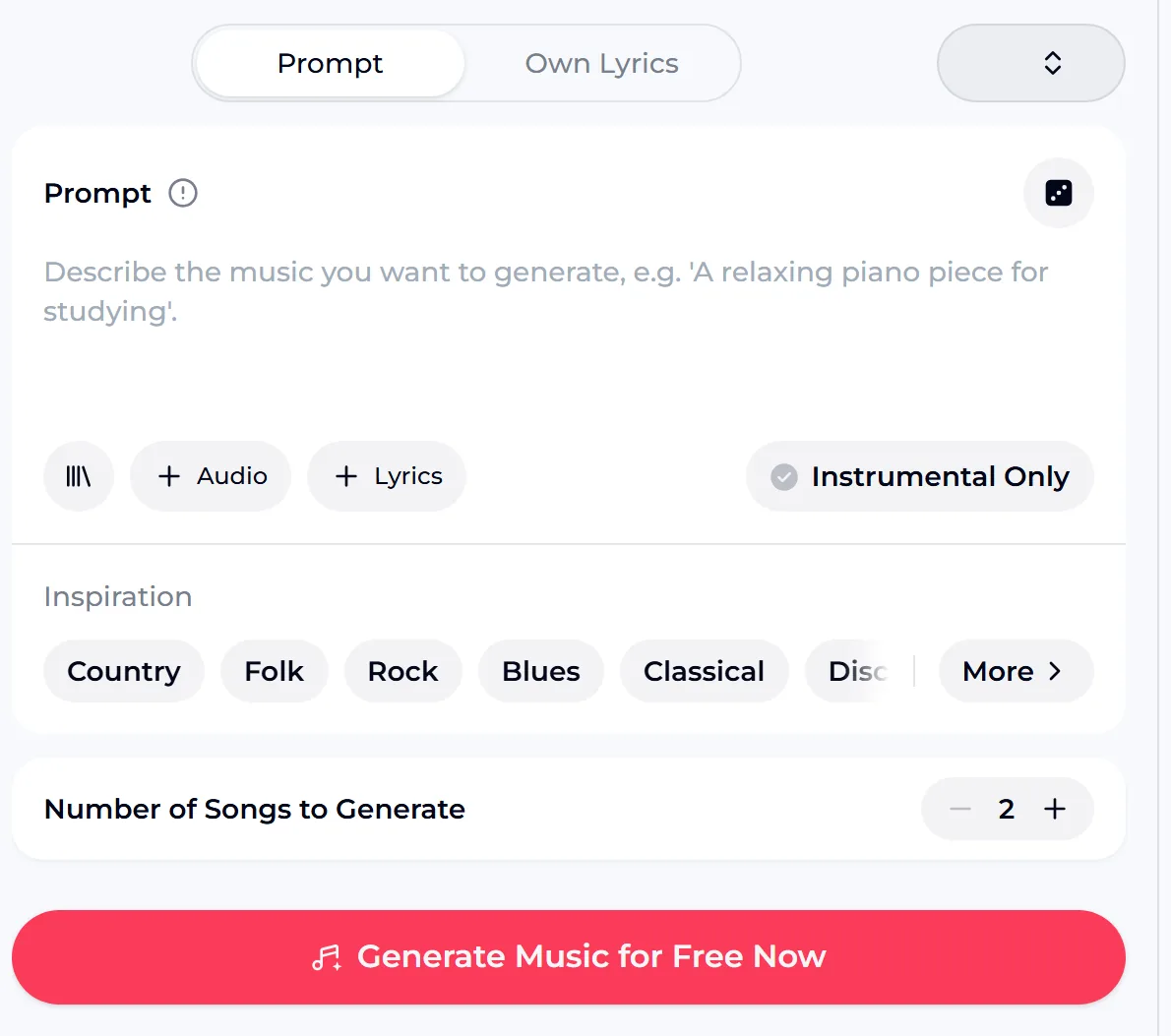
The OpenMusic AI music generator has a Prompt box with three buttons under it: a library button, Audio and Lyrics. The Audio button is where your rough recording goes. Next to them sits the Instrumental Only switch, which keeps vocals out.
Under the prompt you will find Inspiration genre chips and the Number of Songs to Generate setting, which is 2 by default. The generate button at the bottom shows the credits needed before you start, so you always know the cost of a run before you press it.
Prompt
A short line about the style, tempo and mood you want around your sound.
Audio
Upload your recording as a reference for the beat app to work from.
Instrumental Only
Keeps the result a beat, with no vocal on top.
Number of songs
Two by default, so you can compare two takes on the same idea.
Recording a Rough Idea That Works as a Reference
You do not need a microphone, a quiet studio or a dedicated beat app to record. A voice memo on your phone is enough, as long as the idea is clear. Treat the recording as a sketch for the beat app, not a finished part.
It guides the result; it is not turned note for note into a drum pattern, so a clean, simple idea gives a better reference than a long, busy one. One beatmaker suggested a game that fits this way of working well:
“Record 3 sounds around you right now. You have 10 minutes to make a beat using all 3.”— a beatmaker on Reddit
Keep it short
A few bars of the rhythm or riff is enough. Repeat it two or three times so the idea is obvious.
Keep it simple
Tap on one surface or hum one line. Several overlapping ideas make the reference harder to follow.
Find a quiet corner
Turn off fans and music in the room so your sound is the main thing in the recording.
Play with found sounds
Keys, a mug, a spoon on a table: everyday objects make a fun starting point for a beat.
From Your Sound to a Finished Beat
Once the recording is on your phone or computer, the rest happens in the browser. Think of the browser as your beat app: open the AI music generator, add the audio, write a short prompt and generate. Because each beat app run gives two songs by default, you can hear two directions from the same reference and keep the one that fits.
If neither is right, adjust the prompt rather than the recording first; small wording changes about tempo, drums or mood often make the biggest difference. Every result is saved to My Music in your account, so you can come back to it later.
Listen to an instrumental beat sample made on OpenMusic below.
Upload a hummed idea or a rough voice memo, describe the style you hear, and let the beat app build an instrumental around it.
Do You Need to Install a Beat App?
No. You do not need to install a beat app. OpenMusic runs in a web browser, and you can open it in your phone browser too. There is no iOS or Android app to download, so you will not find it in the App Store or Google Play.
For this way of working that is not a drawback: you record on your phone, open the site in the same phone browser, upload the memo and generate. Nothing has to be installed, and your songs stay in My Music when you sign in on another device. Whether you are on a laptop or a phone, the panel and your My Music library are the same.
Beat App Credits and Using Your Beats
The free plan has 30 credits a year, and each song uses 2 credits, which works out to 15 songs. You get free credits after a quick sign-up, and the generate button shows the credits needed before you start. Songs you made on the free plan can be downloaded once you upgrade to any paid plan.
Beats you make in the beat app can be used within the scope of the Commercial License. That covers what you generate; it does not give you rights to someone else's song, so record your own sounds as the reference rather than a clip of a track you do not own.
Other Ways to Make a Beat on OpenMusic
Starting from a sound is one route for a beat app workflow. If you would rather type your idea, or want a different set of controls, these pages share the same account and credits, and every song lands in your My Music library.
Questions About Starting a Beat From a Sound
Can this beat app start a beat from a recording?
Yes. Use the Audio button under the prompt to upload your recording as a reference, switch on Instrumental Only, add a short style prompt and generate.
Will it turn my beatbox into the exact same drum pattern?
No. In the beat app, the recording is a reference that guides the result. It is not converted note for note into a drum part, so expect a beat inspired by your idea rather than a copy of it.
Is there a beat app to install?
No. OpenMusic runs in the browser on desktop and on your phone. There is no iOS or Android app and no desktop app.
Is the beat app free?
The free plan has 30 credits a year and each song uses 2 credits, so that is 15 songs. The generate button shows the credits needed. Songs you made on the free plan can be downloaded once you upgrade to any paid plan.
Can I use the beats commercially?
Yes, within the scope of the Commercial License. Monthly members obtain it for 5 credits per song, annual members obtain it with no extra credits, and Pay Once credits can unlock it for 5 credits per song. Licenses you already obtained stay valid after you cancel. Rights to uploaded third-party songs are not granted.