AI Cover Generator: Your Voice, Start to Finish
Most AI cover generator sites lead with a library of famous voices. The more useful route, and the one that keeps you clear of other people's rights, is to put your own voice on the song.
Below is the full own-voice workflow on OpenMusic: record clean training audio, train a voice model, pick a song you have the right to use, then run the cover and fine-tune the mix.

The Voice Library Pitch Versus the Own-Voice Route
Search for an AI cover generator and the top results tend to promise any song in any voice, often a famous one. That pitch skips the hard question of whose voice it is. A singer's voice is part of their identity and their work, and copying it without permission is exactly the kind of use you should avoid.
On OpenMusic the AI cover generator is built around voice models, and the cleanest model to use is one trained on you. The own-voice route takes a little more setup, but it pays off. The cover sounds like you, you can share it as your own performance, and the only rights left to think about are the song's. The table sets the two approaches side by side.
| Question | Famous-voice pitch | Own-voice route |
|---|---|---|
| Whose voice is it? | Someone else's, usually without consent | Yours |
| Setup needed | Pick from a list | Record and train once, reuse after |
| Can you call it your performance? | No | Yes |
| Song rights | Still need checking | Still need checking |
Record Clean Training Audio for the AI Cover Generator
In any AI cover generator, the quality of your voice model depends on the recordings you train it with. The training page asks for clean, vocal-only audio: at least 1 minute and up to 30 minutes, with about 10 minutes recommended.
Clean means just your voice, without backing music, room echo or added reverb. Think of it as a short recording session rather than a performance; you are giving the model a clear picture of how you sound.
- Record in a quiet room with soft furnishings
- Keep the microphone at a steady distance
- Sing dry: no reverb, no backing track
- Cover your low, middle and high range
- Aim for about 10 minutes in total
Mix soft and strong passages, sustained notes and faster lines, so the model hears more than one side of your voice. If a take has a cough, a phone buzz or a long silence, record it again rather than hoping the model will ignore it. If your best singing only exists inside a finished song, the training page can separate the vocals from it first.

Train Your Voice Model
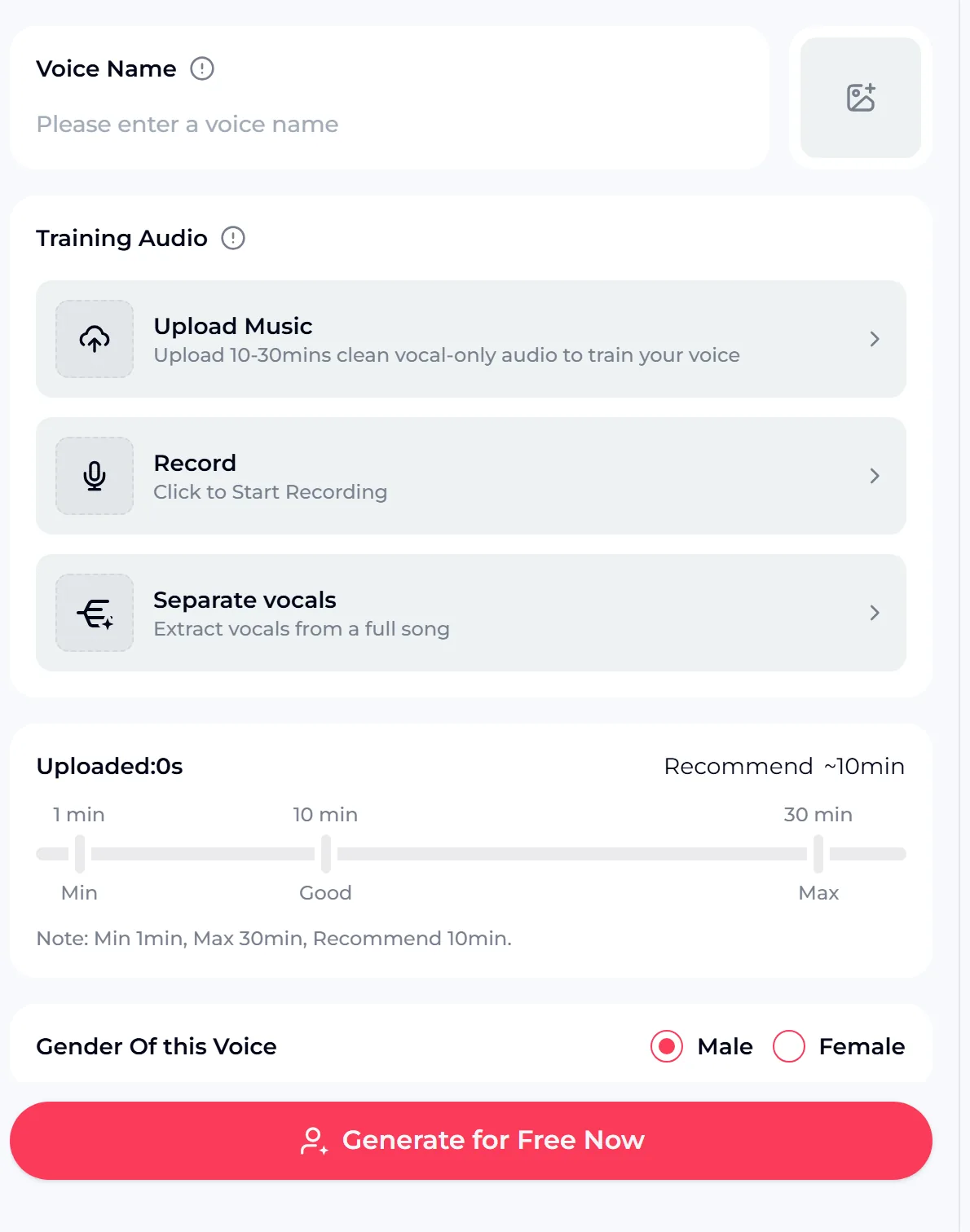
Open the AI Singing Voice Generator and give the voice a name so you can find it later. Under Training Audio you have three ways in: upload clean vocal-only audio, record directly on the page, or separate the vocals from a full song.
A meter shows how much audio you have added against the 1-minute minimum, the recommended 10 minutes and the 30-minute maximum. Choose whether the voice is Male or Female, then start training. The credit cost is shown on the button.
- Voice name
- So you can find the model later
- Training audio
- Upload, record, or separate vocals from a song
- Amount
- 1 to 30 minutes, about 10 recommended
- Gender of this voice
- Male or Female
You only do this once per voice. After training, the model appears under My Voice in the AI cover generator, ready to use on as many songs as you like.
Generate the Cover and Balance the Mix

Now open the AI Song Cover Generator. Choose your trained voice under My Voice, then add the song by uploading audio or picking a track from My Music. Before processing, set the main vocal volume, the instrumental volume and the reverb level; Advanced holds further options. Processing needs you to log in, and the credit cost is shown on the button before you start.
- Voice: your model under My Voice
- Song: one you have the right to use
- Mix: main vocals, instrumental, reverb
- Listen, adjust the sliders, run again if needed
Songs with one clear lead vocal and a simple arrangement give the AI cover generator the cleanest material. If your voice sits too far forward or gets lost, change the vocal and instrumental volume rather than retraining. If you want the instrumental on its own for other work, the AI vocal remover is a separate tool for that.
Upload the song to the AI cover generator, pick your trained voice and balance the vocal and instrumental volume until the cover sits the way you want.
What You Can and Cannot Cover
Training a model on your own voice settles the voice side, but the song is a separate question. Uploading a track to an AI cover generator does not give you any rights to it; the music still belongs to its rights holders.
A cover of a song you wrote, or one you have permission to use, is the clear case. For anything else, check before you share or release it. And whatever the song, do not use the AI cover generator to imitate a real singer.
- Your own voice, or one you have permission to use
- No imitation of real singers
- Songs you wrote or have the right to use
- Uploaded songs stay with their rights holders
Credits and the Commercial License
A free AI cover generator account includes 30 credits a year, and the credit cost of each job is shown on the button before you start. If a job fails, the credits are normally refunded automatically. Songs made on a free account can be downloaded later with credits and receive a Commercial License.
- For music you have the rights to, you can use your results within the scope of the Commercial License: monthly members get a song's license for 5 credits, annual members pay no extra credits, and Pay Once credit holders can spend 5 credits per song, so an annual plan is not required.
- Licenses you have obtained stay valid after cancelling.
A license does not give you rights to someone else's song that you uploaded.
- Free plan: 30 credits a year
- Credit cost shown on the button
- Licenses stay valid after cancelling
- No rights to uploaded third-party songs
AI Cover Generator Questions
Can I make a cover with my own voice?
Yes. Train a voice model in the AI Singing Voice Generator with 1 to 30 minutes of clean vocal-only audio, about 10 minutes recommended, by uploading or recording it, and choose Male or Female. The model then appears under My Voice in the AI Cover Generator.
Can I use celebrity voices?
No. Whether you use it as a free AI cover generator or on a paid plan, it is for your own voice or a voice you have clear permission to use, so do not imitate real singers.
How much training audio do I need?
At least 1 minute and up to 30 minutes, with about 10 minutes recommended. Clean, dry recordings across your range matter more than length.
Is the AI cover generator free?
You can try the AI cover generator free: the free plan includes 30 credits a year, and the credit cost of each job is shown on the button. Songs made on a free account can be downloaded later with credits and receive a Commercial License.
Put Your Own Voice on the Song
Record about 10 minutes of clean, dry singing, train a voice model in the AI Singing Voice Generator, and choose Male or Female. Then open the AI Cover Generator, pick your voice under My Voice, add a song you have the right to use and balance the vocal, instrumental and reverb.
The credit cost is shown on the button, the free plan includes 30 credits a year, and your results can be used within the scope of the Commercial License for music you have the rights to.