AI Lyric Maker for Memorial Songs
When a family wants to say goodbye in a song, the hardest part is finding the words. An AI lyric maker can turn the stories you share about someone, the garden, the Sunday baking, the thing they always said, into a first draft of lyrics for a memorial or celebration of life. You then change every line until it sounds like your family.
Start the LyricsFamily and Friends, One Set of Words
A memorial song is rarely written by one person. Relatives bring the stories, friends and community bring the moments outside the family, and the song needs room for both.
Shared memories
Family members know the routines and the private jokes: the kitchen, the holidays, the nickname only the grandchildren used. Ask each of them for one small scene rather than a summary of a whole life; the AI lyric maker works best with scenes.
Friends, neighbours, choir or club members see a different side: the volunteer, the teammate, the person who always brought soup. Their memories often give the song its warmest verse.
Three Ways to Use a Memorial Lyric
Decide how the words will be used before you open the AI lyric maker, because it changes how many lines you need and how simple the chorus should be.
One verse and a chorus, read by a family member during the service or printed in the programme.
Two short verses and a chorus simple enough for everyone to join on the second time through. Verse-Chorus structure keeps it familiar.
A full song with more verses or a bridge, turned into music afterwards and shared with the family as a lasting memory.

Writing together at one table is often easier than writing alone. One person types the notes, everyone else talks, and small details come out that nobody would have written on their own.
The AI lyric maker is useful at exactly that moment: it turns a page of scattered notes into verses and a chorus you can read back to the family, argue about kindly, and rewrite.
Setting Up the AI Lyrics Generator
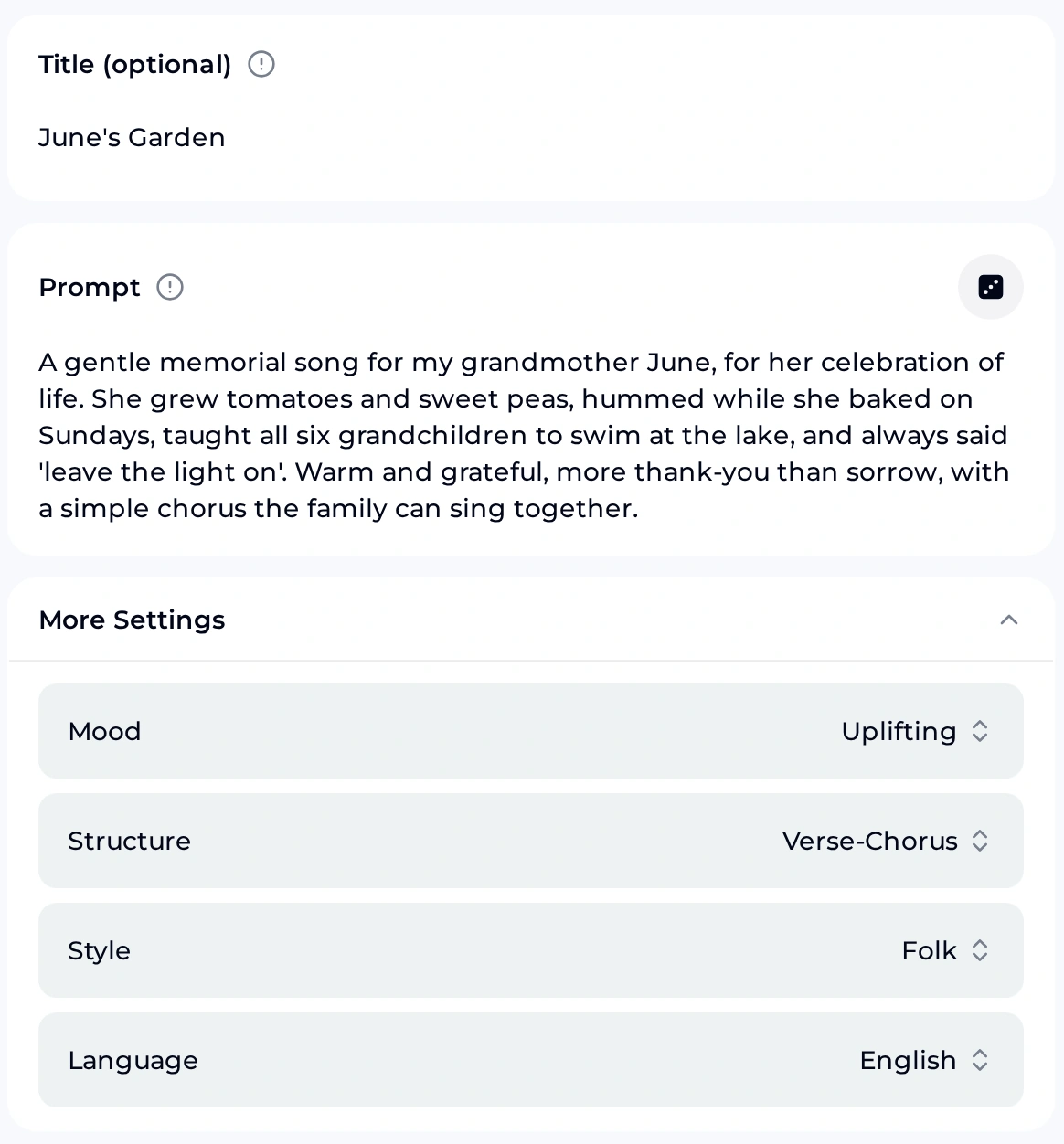
Our example for Grandma June
- Add a Title, such as the name of a place they loved.
- Write the Prompt: who the song is for, three or four real details, and the feeling you want.
- Open More Settings and choose Mood, Structure, Style and Language.
- Generate, then read the draft aloud with the family.
We picked Uplifting rather than Sad or Melancholic because the family wanted the song to sound grateful. Mood also offers Happy, Romantic and Energetic; Structure offers Verse-Chorus, Verse-Chorus-Bridge, AABA, ABABCB and Free Form.
In the AI lyric maker, Style has eight options, including Folk, Country and Pop, and Language has ten. Choose the language the person spoke at home if the family wants that; you can mix languages later when you edit. How each choice changes the draft is something to judge when you read it.
Write the First Draft Together
Gather three real memories, add them to the Prompt, choose a gentle mood and let the AI lyric maker give your family words to start from.
Open the Lyrics GeneratorFrom a General Request to Real Memories
The more specific the prompt, the more the draft sounds like the person. Here is how one family turned a general request into a prompt the AI lyric maker could work with:
a sad song about losing my grandma gentle memorial song for my grandmother June: she grew tomatoes and sweet peas, hummed while baking on Sundays, taught six grandchildren to swim at the lake, always said 'leave the light on'; grateful more than sad, simple chorus to sing together
A tip from songwriters that works well here: start with the most literal version of each memory, then let one detail become an image. "She left the porch light on for us" can turn into a chorus about coming home.
If the family would like to hear the finished lyric as a song, paste it into Own Lyrics in the AI Music Generator, describe a gentle sound in Styles and choose a voice. Keep the final words the family agreed on, so nobody is surprised at the service.
Writing Words the Whole Family Can Stand Behind
A memorial lyric is shared by many people who loved the same person in different ways. These four habits keep the process kind and the words clear.
Agree on the tone first. Decide together whether the song should be grateful, gentle or quietly funny. Funeral directors see joke songs split families, so agree before anyone writes.
Ask before you name. Check with anyone named in a line, and keep the song about their life: leave illness, hospital details and family disagreements out.
Read it out loud. Lines that look fine on paper can be hard to say with emotion. Read the draft aloud and shorten anything that catches.
One editor, a printed copy. Collect everyone's memories, let one person make the final edit, then print the lyric in the programme so guests can follow.
AI Lyric Maker FAQ for Memorial Songs
Questions families ask before, during and after writing a memorial lyric, from credits and licences to downloading the song for the service.
Is there a free way to start?
You get free credits after a quick sign-up: the free plan includes 30 credits a year, and every generation uses credits. Sign up, open the AI lyric maker, paste the family stories you already have into the Prompt, choose a gentle mood, and read the first draft together before you change a single line.
For a memorial, start with the lyrics, gather the family's stories and agree on the words. Only turn them into music once everyone is happy, so the song you share is the one the family chose together.
Will the AI know the person we lost?
No. The AI lyric maker only knows what you put in the Prompt. Without real details it can only write general lines that could be about anyone.
That is why the memories matter most. Three specific scenes, their own phrases and the places they loved will do more for the lyric than any setting, and the family's edits make the words truly theirs.
Can we change the draft?
Yes, and you should. Treat the AI lyric maker draft as a starting point: swap in real names, replace any line that does not sound like your family, and cut verses until the lyric fits how it will be used.
Many families keep the structure of the draft and rewrite most of the words. That is a perfectly good way to use an AI lyric maker for something this personal.
Can we turn the lyrics into a song and share it?
Monthly and yearly plans both let you use songs made from AI lyric maker lyrics commercially within the scope of the Commercial License. Monthly plans pay 5 credits per song for the licence certificate; yearly plans pay nothing extra.
You can buy Pay Once one-time credits. They do not include the licence automatically, but you can spend 5 credits per song to get it. For a private memorial, ask the family before posting a song publicly.
Can we download the song for the service?
Paid plans can download MP3, WAV and FLAC, including songs made on the free plan; free users can download only a limited number.
Ask the venue or funeral home which format and device they use, and test playback before the day. Bring a second copy on another device in case the first one fails, and give the file a clear name so whoever runs the sound can find it quickly.
What happens to unused credits?
Monthly and yearly plans add credits every month, and unused credits reset on your renewal date. If a generation fails, the credits usually come back automatically.
If the family wants a keepsake song later, such as for an anniversary of the day, you can come back to the same lyric in the AI lyric maker and make a new version then. Keep the agreed lyric saved somewhere the whole family can reach.
Find the Words Together
Share the stories, choose a gentle mood and let the AI lyric maker help your family write a song that remembers them well.