Write Your Own Songs Lyrics: An AI Co-Writer for Beginners
To write your own songs lyrics, bring the story and the feeling. Let the AI Lyric Writer give you a first draft, then rewrite it until every line sounds like you.
Start My Lyrics


An AI Co-Writer Helps Most When You Already Have Something to Say
Tick the lines that sound like you before you write your own songs lyrics. A blank page is the hardest part of songwriting, and a draft gives you something to push against.
- You have a story or memory you want to turn into a song.
- You can hum a tune but get stuck after the first verse.
- You want lyrics for a birthday, wedding toast or class project.
- You write poems and want to try a verse-chorus shape.
- You want to hear your words sung, not only read them.
- You are looking for someone to bounce lines off.
Three or more? An AI co-writer fits how you write your own songs lyrics.
How to Write Your Own Songs Lyrics as a Beginner
Start with one clear idea, let the tool draft around it, then make the draft yours.
- Write one sentence about the song. Who is singing, to whom, and what changed? Type it in the Prompt box of the AI Lyric Writer.
- Set the frame. Open More Settings and choose Mood, Structure, Style and Language. Verse-Chorus is the default structure and a safe start.
- Generate a draft. Read it out loud and mark the lines that feel true and the ones that feel generic.
- Rewrite in your voice. Swap in real names, places and details only you know. Keep the chorus short so it is easy to repeat.
- Hear it sung. Paste your final words into a song tool and listen for lines that are hard to sing.
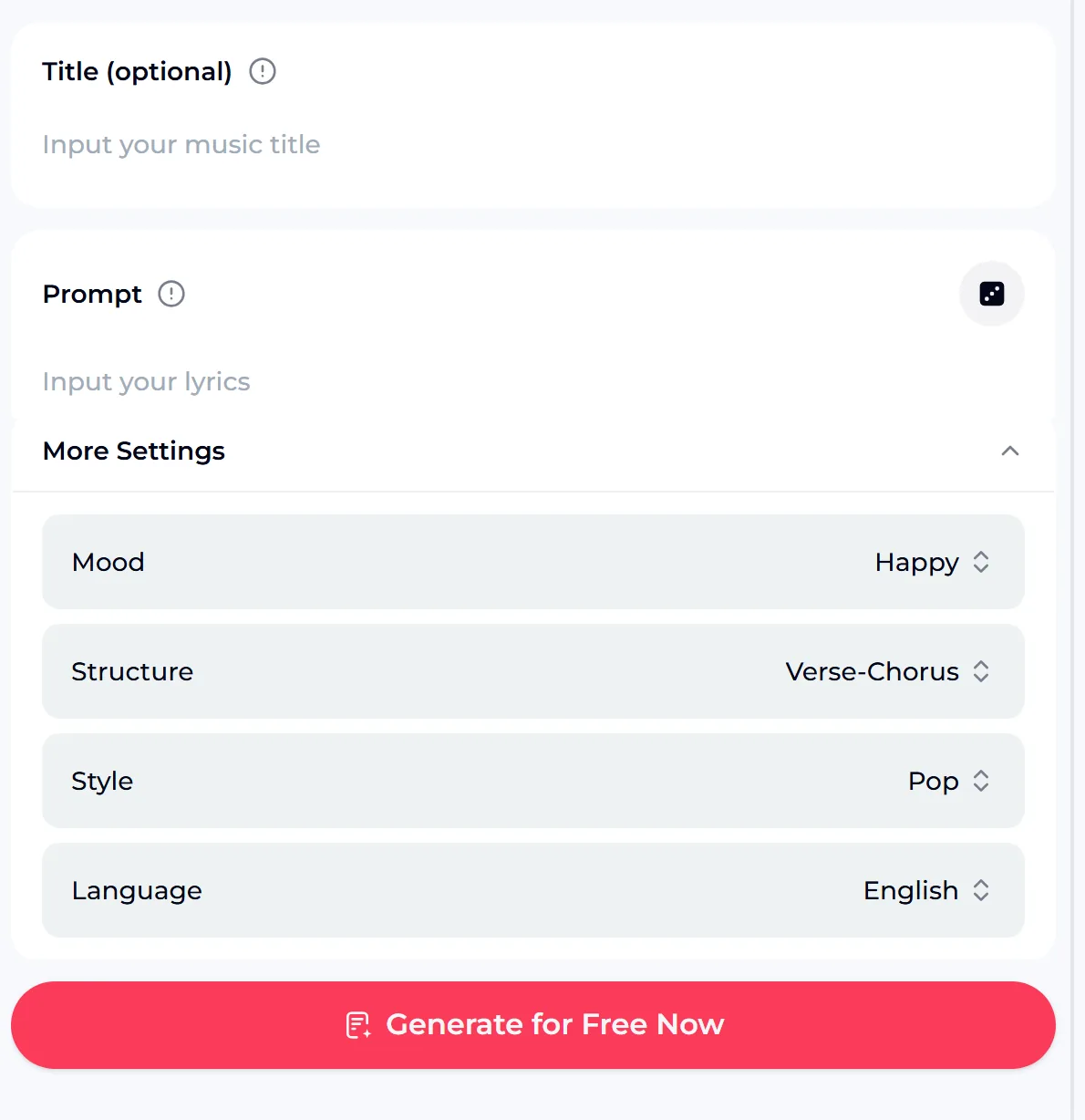
Specific Prompts Give You Drafts Worth Rewriting
If you write your own songs lyrics from a vague prompt, you get a vague draft. Each edit below adds who, where and what changed, so the first draft already holds details you can keep.
Type the story behind your song, set mood and structure, and get a draft to rewrite as you write your own songs lyrics. Sign up for free credits and start now.
Pick the Tool That Matches Your Next Step
Each OpenMusic tool below handles one part of the job when you write your own songs lyrics and want to hear them. Swipe sideways on a phone to compare the tools that help you write your own songs lyrics.
| Tool | Best step | What you type | Settings |
|---|---|---|---|
| AI Lyric Writer | First draft from an idea | Title (optional), Prompt | Mood, Structure, Style, Language |
| AI Lyrics Generator | A second draft to compare | Title, Prompt | Mood, Structure, Style, Language |
| Text to Song Generator | Hear the words as a song | Your words | Pure instrumental or vocal modes |
| AI Music Generator | Sing your finished lyrics | Your lyrics in the Own Lyrics tab | Own Lyrics mode, Instrumental Only toggle |
Most writers draft with the AI Lyric Writer, compare with the AI Lyrics Generator, then sing the result with the Text to Song Generator.
Six Rules That Make AI-Drafted Lyrics Sound Like You
When you write your own songs lyrics with AI, the draft is raw material; these habits turn it into your song.
Keep one idea per song. If the draft wanders into two stories, cut one.
Show, don't tell. Replace "I feel lonely" with an image, like one cup on the table.
Make the chorus the title. A short, repeatable line is easier to remember.
Let verses move the story. Each verse should add new time, place or detail.
Try the blues shape. For blues lyrics, state a line, repeat it, then answer it.
Sing every line out loud. If you trip over a word, change it.
Answer Four Questions Before You Generate
Before you write your own songs lyrics with AI, these answers decide which tool and settings fit, and what the tool will not do for you.
- Do you only want words? Use the AI Lyric Writer and keep the text.
- Do you want to hear them sung? Move your final lyrics into the Text to Song Generator or the Own Lyrics tab of the AI Music Generator.
- Writing over a song you love? New words on an existing melody can still raise copyright issues, so write to your own tune instead.
- Need a download? Paid plans include MP3, WAV and FLAC. Songs you made on the free plan can be downloaded once you upgrade to any paid plan.
Questions When You Write Your Own Songs Lyrics
01 Can I write my own song if I can't play an instrument?
Yes. To write your own songs lyrics, start with words and a hummed idea. Write the story first, shape it into verses and a chorus, and use the AI Lyric Writer when you get stuck on a line. When the words are ready, paste them into the Text to Song Generator or the Own Lyrics tab of the AI Music Generator to hear them with music. You can then adjust lines that are hard to sing and try again until the song feels right.
02 Are the lyrics still mine if AI drafted them?
In song lyrics writing, treat the draft as a starting point, not the finished song. The more you rewrite with your own details, images and phrasing, the more the lyrics reflect your voice. Songs you make on OpenMusic can be used within the scope of the Commercial License, so check your plan and the license terms before you release or sell anything. Avoid copying lines from existing songs into your prompt or your final lyrics.
03 Can I write my own song lyrics online free?
You can start free. After sign-up, the free plan gives 30 credits a year, and each generate button shows how many credits it needs before you press it. That is enough to draft a few versions of your lyrics and hear one as a song. Paid plans include MP3, WAV and FLAC downloads. Songs you made on the free plan can be downloaded once you upgrade to any paid plan.
04 Can I put new lyrics on a popular song?
Writing new words to an existing melody is a fun exercise in private, but the melody still belongs to its writers, so sharing or selling it can cause copyright problems. A safer route is to write your lyrics, then let OpenMusic create an original melody and arrangement around them. You keep the fun of writing your own words without leaning on someone else's music, and you get a song you can share.
05 Does it work in other languages or on a phone?
For song lyrics writing in another language, the AI Lyric Writer has a Language setting, so pick the language you want before you generate. OpenMusic runs in the browser on Windows, Mac, Chromebook, iPhone and Android, with no store download to install. Open the page, sign in and use the same panel on any device. Your drafts and songs stay in your account, so you can start lyrics on a phone and finish them on a laptop.
Write the Song Only You Can Write
Write your own songs lyrics from your own story: get a draft to push against, and rewrite it until it sounds like you. Sign up for free credits and begin today.
Write My Lyrics