Remove Vocals: Sing Along at Home
Karaoke apps only carry the songs someone else chose to license. If the track you love is a deep cut, a local band or a song from years ago, you can remove vocals and make your own backing instead.
Remove vocals from the song, check that the key suits your voice, and practise over the music as many times as you like. Below is a singer's route for doing that on OpenMusic, plus what the odd watery sounds in a separated track actually mean.

Your Own Backing Track, Any Song
Most people who want to remove vocals are not producers. They are singers who want to hear themselves over the real arrangement of a song they love. One Reddit poster in r/WeAreTheMusicMakers summed up the goal: "remove the vocals so I can sing along to the music myself."
- The same thread is full of complaints about free tools that tried to remove vocals and left the music sounding broken, which is why it helps to know what to expect before you start.
- Being able to remove vocals at home is useful for more than karaoke night.
You can rehearse a song before an open mic, learn the phrasing of a tricky verse, record a practice take to hear where you go flat, or warm up over music instead of scales. When you remove vocals for practice, the point is not a perfect instrumental; it is a backing good enough that you can sing with confidence.
| Goal | What you need | OpenMusic tool |
|---|---|---|
| Sing over the real song | The music without the lead vocal | AI Vocal Remover |
| Fit the song to your voice | The same backing in a different key | Audio Pitch Changer |
| Know your comfortable range | Your lowest and highest easy notes | Vocal range test |
Remove Vocals With the AI Vocal Remover
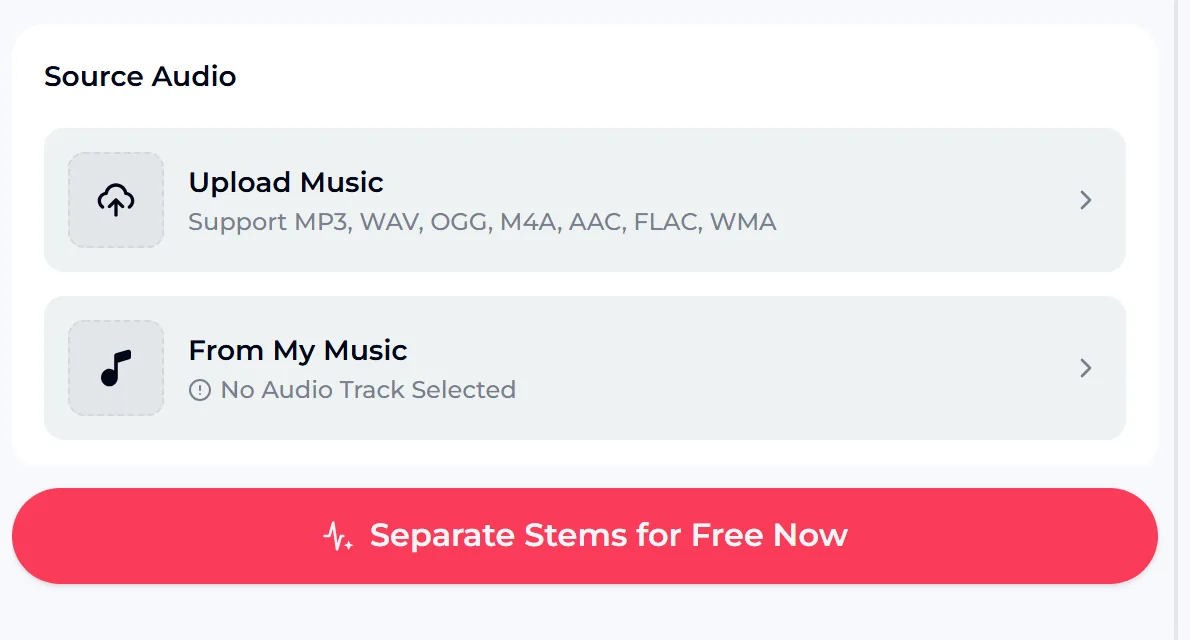
Open the AI Vocal Remover. To remove vocals online, use Source Audio: you can upload a music file in MP3, WAV, OGG, M4A, AAC, FLAC or WMA, or pick a track you already have under From My Music.
When you remove vocals here, the tool separates the vocals from the accompaniment, so you end up with the backing you sing over and the vocal on its own, which is handy for learning the melody. The tool works with audio files; if your song is inside a video, save the audio first. The credit cost is shown on the button before you start.
- Input
- Upload an audio file or choose From My Music
- Upload types
- MP3, WAV, OGG, M4A, AAC, FLAC, WMA
- Result
- Vocals and accompaniment, separated
- Cost
- Shown on the button before you start
To remove vocals cleanly, start from the best copy of the song you have. A clean, full-quality file gives the separation much more to work with than a compressed copy of a copy. If the song you want lives on YouTube, the YouTube vocal remover page is another place to start.
Make the Key Fit Your Voice
The original singer's key is often not yours. If the chorus sits too high or the verse rumbles too low, you will strain or mumble, and practice stops being fun. Before you rehearse, take a quick vocal range test so you know your comfortable low and high notes, then compare them with the song.
After you remove vocals, move the song by putting the backing into the Audio Pitch Changer. It raises or lowers pitch in semitones or cents, lets you adjust tempo separately so the key changes without the song speeding up, has a reverb control, and lets you preview the result. A shift of one or two semitones is often enough to turn a strained chorus into a comfortable one.
Upload the song, remove the vocals, and shift the backing one or two semitones if the chorus feels strained.
- Check your range before choosing a key
- Shift in semitones; fine-tune in cents
- Slow the tempo separately to learn fast lines
- Preview before you commit to a version
Why a Backing Can Sound Wobbly or Robotic
When you remove vocals with any tool, the software has to guess which parts of a mixed recording belong to the voice. Where the singer and an instrument share the same notes, or where heavy reverb smears the voice across the mix, the guess is harder.
- That is where you hear the tell-tale artifacts: a faint ghost of the vocal, a watery or warbling texture on cymbals and guitars, or a slightly robotic edge on sustained notes.
- When you remove vocals for singing practice, small artifacts rarely matter.
- Your own voice covers most of them, and a ghost vocal can even help you find the melody.
If a backing is too damaged to use, try a cleaner source file or a different song version, such as a studio recording instead of a live one. Songs with a clear lead vocal and a simple arrangement usually let you remove vocals most cleanly.
- Ghost vocal: a faint trace of the original singer
- Warble: watery texture on cymbals or guitars
- Robotic edge: thin sound on long notes
- Fix: start from a cleaner, studio version
A Simple Home Practice Routine
Once you remove vocals and set the key, the backing becomes a practice tool. Sing the song through once just to enjoy it. Then loop the hardest section, sing it three or four times, and record yourself on your phone. Listen back for the spots where you go sharp, run out of breath or rush the words.
Those are the lines to work on next time. Keep the separated vocal around too. Listening to the isolated lead line is one of the fastest ways to learn phrasing, breathing spots and small ornaments you would miss in the full mix. Sing along with the vocal first, then switch to the backing and see whether you can hold the melody alone.
- Run the whole song once for fun
- Loop the hardest section and repeat it
- Record a take and listen back
- Learn phrasing from the isolated vocal

Credits, Rights and the Commercial License
The free plan includes 30 credits a year, and the credit cost of each job is shown on the button before you start. If a job fails, the credits are normally refunded automatically. Using a tool to remove vocals from a song you uploaded does not give you any rights to it; the music still belongs to its rights holders, so a backing for private practice is the safe use.
- Sharing or performing it publicly is a separate question for the song's owners.
- For music you have the rights to, and for songs you make on OpenMusic, you can use your results within the scope of the Commercial License: monthly members get a song's license for 5 credits, annual members pay no extra credits, and Pay Once credit holders can spend 5 credits per song.
Songs made on a free account can be downloaded later with credits and receive a Commercial License.
- Free plan: 30 credits a year
- Credit cost shown on the button
- Uploaded songs stay with their owners
- Private practice is the safe use
Remove Vocals Questions
How do I make a karaoke version of a song?
Upload the song to the AI Vocal Remover, or pick it from My Music, and remove vocals online by separating them from the accompaniment. If the key does not suit you, run the backing through the Audio Pitch Changer and shift it by a semitone or two.
Can I change the key to fit my voice?
Yes. The Audio Pitch Changer moves pitch in semitones or cents and lets you change tempo separately, so the key changes without the song speeding up. You can preview before you keep it.
Why does the backing sound a bit strange?
Any tool that can remove vocals from a finished mix is making a best guess. Where the voice and instruments overlap, you may hear a faint ghost vocal or a watery texture. A cleaner source file and a song with a clear lead vocal usually give a better result.
Can I remove vocals for free?
To remove vocals for free at first, use the free plan: it includes 30 credits a year, and the credit cost of each job is shown on the button before you start.
Can I use the separated tracks?
Uploading a song does not give you rights to it. Use backings of other people's songs for private practice, and check with the rights holders before sharing or performing them.
Sing Over the Song You Love
Pick the best copy of the song you have, remove vocals in the AI Vocal Remover, and keep both the backing and the isolated vocal.
Check your range, move the key with the Audio Pitch Changer if you need to, and start practising: one run for fun, then loops on the hard parts and a recorded take to listen back to. The free plan includes 30 credits a year and the credit cost is shown on the button.