
Make it, measure it, split it
AI Generated Audio
AI generated audio is music written by AI from a text description or your own lyrics. On OpenMusic you can generate a track, read its key and tempo, and split it into separate stems, all in the browser. Each job has its own tool, and the steps below take them in order.
- 1Generate in the AI Music Generator
- 2Measure with the Key & BPM Finder
- 3Split with the AI Stem Splitter
Common snags
Where AI Generated Audio Work Gets Stuck
AI audio generation is usually the easy part. The trouble starts when you try to use it next to other audio or edit it.
Its key and tempo are a mystery
Matching the track to a vocal, a loop or another song starts with those two numbers. Run it through the Key & BPM Finder first.
One part is too loud or in the way
In a full mix the drums and the vocal move together. Split it into stems and keep only the parts you want.
The first result is almost there
Rewriting the whole brief loses what worked. Change one word in the description and generate again.
Step one
How to Generate AI Generated Audio on OpenMusic
To generate audio with AI, start in the AI Music Generator. You need a short brief and a decision about vocals.
- 1
Pick a tab
Describe the sound on the Prompt tab, or switch to Own Lyrics for words you wrote yourself.
- 2
Write the brief
Name a genre, a mood and two instruments. Switch on Instrumental Only for instrumental AI generated audio.
- 3
Generate and listen
Press Generate Music for Free Now. Number of Songs to Generate defaults to 2, so you can compare the results.
Planning to split the track later? Leave Instrumental Only off so the result has a vocal you can separate, and switch it on when you only need backing music for a voiceover or a video.
Step two
AI Generated Audio Example Takes, Measured
Two example takes, each checked with the Key & BPM Finder on 30 October 2026. The finder reads the key, an alternate key code and the tempo from the uploaded file.
| Take | Key | Alt Key | BPM | Listen |
|---|---|---|---|---|
| Example take 1 | C major | 8B | 97 | |
| Example take 2 | G minor | 6A | 104 |
Both files went up in one batch, since the Key & BPM Finder accepts several files at once. Energy, Danceability and Happiness columns also appear, but they show as locked (Unlock) when you are signed out.
Step three
Split AI Generated Audio Into Stems
The AI Stem Splitter takes a finished track apart so you can edit, remix or practise with single parts.
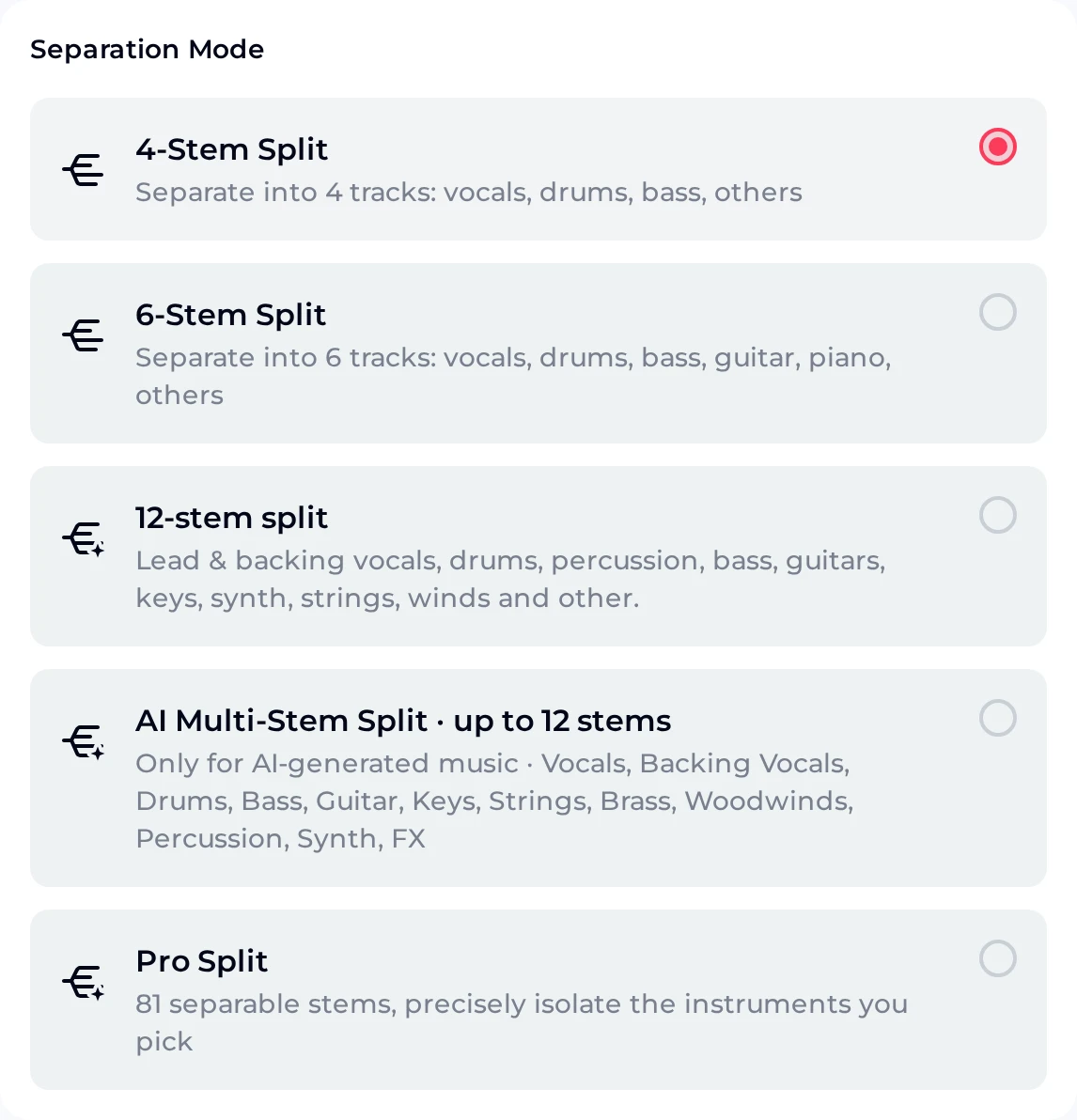
Upload an MP3, WAV, OGG, M4A, AAC, FLAC or WMA file, or pick a track from My Music, then choose a Separation Mode.
| 4-Stem Split | vocals, drums, bass, others |
|---|---|
| 6-Stem Split | vocals, drums, bass, guitar, piano, others |
| More modes | The panel also lists other split modes. |
Pick 4-Stem or 6-Stem, then press Separate Stems for Free Now.
Checks
AI Generated Audio Checks Before You Use a Track
Four quick checks that catch most problems before a track goes into a video, a mix or a set.
Listen to the end
Play every result to the last second at the same volume.
Write down key and BPM
Keep both numbers in the file name or your notes, so matching parts later is quick.
Split only when needed
Use 4 stems for a simple edit and 6 stems when you need guitar or piano on its own.
Keep the brief
Save the description that produced the track, then change one word at a time on reruns.
Credits and rights
AI Generated Audio Credits, Downloads and Rights
Each generated track costs 2 credits, and the cost shows on the generate button before the run. Signing up gives you 30 free credits a year, about 15 generations at 2 credits per song. Unused credits reset on your renewal date.
- Downloads
- Free users can download a limited number of songs. Paid plans download MP3, WAV and FLAC.
- Commercial rights
- Monthly and annual plans both include commercial rights, within the scope of the Commercial License, for the tracks you generate, measure and split here.
- License certificate
- Within the scope of the Commercial License, the certificate is 5 credits per song on monthly plans and Pay Once, and 0 extra credits on annual plans.
- After you cancel
- Licenses you already obtained stay valid. Download songs and license files while your membership is active.
FAQ
AI Generated Audio FAQ
Answers about making, measuring and splitting tracks.
What is AI generated audio?
AI generated audio from text is music written by AI from your instructions instead of being recorded by players. On OpenMusic you describe the music in the Prompt tab, or paste your own lyrics in the Own Lyrics tab, and the AI Music Generator writes a full track. You can switch on Instrumental Only for an instrumental track, and Number of Songs to Generate defaults to 2.
How do I find the key and BPM of a generated track?
Download the track, then upload it to the Key & BPM Finder. It accepts several files at once and shows the file name, key, alternate key and BPM for each. It takes MP3, WAV, FLAC, OGG and other formats. Our two example takes read as C major at 97 BPM and G minor at 104 BPM. Energy, Danceability and Happiness show as locked (Unlock) when you are signed out.
Can I separate the vocals from AI generated audio?
Yes. The AI Stem Splitter separates a track into 4 stems (vocals, drums, bass, others) or 6 stems, which adds guitar and piano. It accepts MP3, WAV, OGG, M4A, AAC, FLAC and WMA uploads, or a track from My Music. Press Separate Stems for Free Now to start.
The panel also lists other split modes. For a vocal on its own, 4-Stem Split already gives you a vocals stem.
How many credits does generating use?
Each song costs 2 credits. Signing up gives you 30 free credits a year, about 15 generations at 2 credits per song. Unused credits reset on your renewal date, so plan larger batches inside one billing period.
On monthly and annual plans, credits arrive one month at a time. If you run out, you can also buy Pay Once credits as a one-time purchase.
Do I need an app?
OpenMusic runs in your web browser. The generator, the Key & BPM Finder and the AI Stem Splitter all open as web pages, and the generator opens on phones and computers alike. Open the page, sign in, and the same three tools are ready on every device you use. Bookmark the AI Music Generator so the first step of the workflow is one tap away whenever an idea for a track turns up.
Can I publish what I make?
Monthly and annual plans both include commercial rights, within the scope of the Commercial License. Within the scope of the Commercial License, a license certificate costs 5 credits per song on monthly plans and Pay Once, and 0 extra credits on annual plans, so budget it next to the 2 credits each generated track uses.
Licenses you already obtained stay valid if you cancel. Cancelling can limit downloads later, so download songs and license files while your membership is active. Free users can download a limited number of songs.
Make Your First AI Generated Audio Track
To make AI generated audio, write a one-line brief in the AI Music Generator, generate it, then measure the key and BPM and split the result into stems.
- 1Generate
- 2Measure
- 3Split