Background music that fits the cut
Describe the scene and pace, turn on Instrumental Only, and get a wordless bed that sits under speech or titles.
One sentence, two takes
Describe a song in one sentence and OpenMusic generates an original song or instrumental from it, two takes by default, so you can pick by ear. It works for video backgrounds, demos, and lyrics you already wrote, and it is just as handy for skating programs and floor routines that need their own wordless music.
Stock libraries hand everyone the same safe tracks, and writing music from scratch takes skills and time most people do not have. To AI generate music, you only need to say what the track is for: the mood, the pace, and the sound.
The generator writes a new track from that sentence, so the music fits your project instead of the other way round.
Describe the scene and pace, turn on Instrumental Only, and get a wordless bed that sits under speech or titles.
Paste your words in Own Lyrics, describe the style, and pick Random, Male or Female for the vocal.
Write one brief per section of a skating or floor program, such as the opening and the peak, and judge each pair of takes against the athlete.
Whenever you generate AI music here, every run follows the same short loop: one clear sentence, two takes, one careful listen, then keep the better take or change one detail.
Stay on the Prompt tab to describe the music, or switch to Own Lyrics when you already have words to sing.
Turn on Instrumental Only before the run if the track has to stay wordless, or leave it off for a sung version.
Name the genre, the mood, and two or three instruments, for example "warm acoustic folk, gentle guitar and soft piano, for a travel video". Add Inspiration tags only after that sentence is clear.
Press Generate Music for Free Now and sign in when asked. Number of Songs to Generate starts at 2, so play both takes at the same volume.
Download the take that fits. If both miss, change one word, such as the mood or one instrument, and run again.
Everything you need to AI generate music from text sits on one card: the Prompt box, the Audio and Lyrics buttons, the Instrumental Only toggle, the Inspiration tags, and the song count. The capture shows a typed one-sentence brief with Instrumental Only switched on; the tags and the song count sit just below it on the same card.
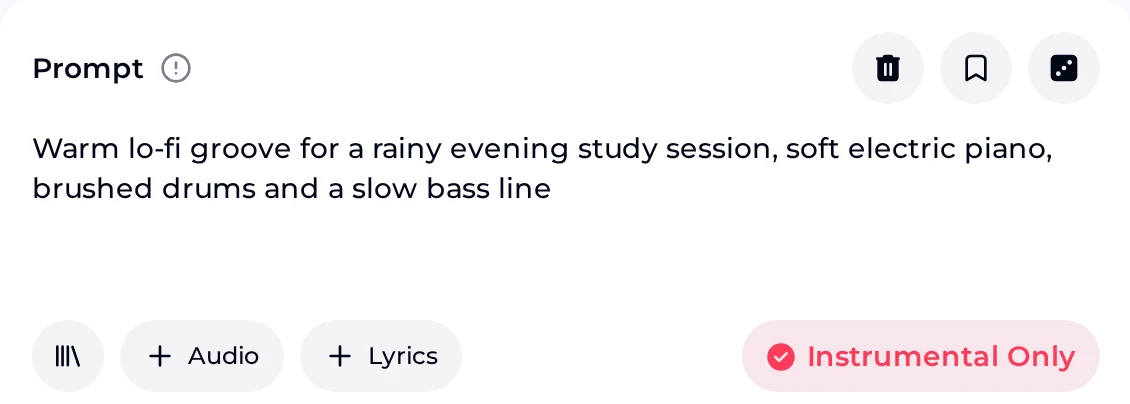
One typed sentence is enough to get finished audio you can play straight away. Here is what a run hands back and what you can do with it afterwards.
Most weak runs come from the same four habits. Each one has a simple replacement that makes the next pair of takes easier to judge.
You get new audio written from your sentence. Choosing the take, checking where it will be used, and the final mix stay with you, and every run uses credits.
You describe the music in the Prompt box, and the AI Music Generator writes new tracks from that description. Name the style, mood, or scene, plus two or three instruments, in one sentence. Leave the song counter at its opening value of 2 and you get two takes to judge at the same volume.
Keep the take that fits and download it. If both miss, change one detail and run again.
Yes. Turn on Instrumental Only before you generate, so each take in that run comes back as pure instrumental music. Then describe the track in plain words, such as "calm lo-fi beat, soft keys, for a study video", and name two or three instruments you want to hear so the music supports the scene. Each run gives two takes, so play both under your video before you keep one.
Yes. To AI generate music from lyrics you wrote, switch over to Own Lyrics and drop your verses and chorus into the Lyrics box. Then give the Styles box a short line on genre and feel, for example warm acoustic folk, slow and hopeful. A title of up to 80 characters is optional, and the vocal can be set to Male, Female or Random. Listen against your lines: if the melody crowds a verse, trim that verse rather than packing more words into the style line.
Each song costs 2 credits. With a signed-up account, your free plan carries 30 credits a year, enough for 15 generations, and any left over clear on the renewal date, so use them on real projects instead of saving them.
If you need more, move to a paid plan or buy credits once with Pay Once. Free users can download a limited number of songs; paid plans download MP3, WAV, and FLAC.
Yes, within the scope of the Commercial License. Monthly and annual plans both cover use within the scope of the Commercial License; the certificate costs 5 credits per song on monthly or Pay Once, 0 on annual.
Licenses you have already obtained stay valid within the scope of the Commercial License if you cancel later, and songs you have already released can keep earning. Downloads may be limited after you cancel, so download your songs and license files while your plan is active.
One sentence that says what the track is for and how it should sound. The placeholder gives the idea: "A relaxing piano piece for studying." Add the genre, the mood, and two or three instruments, and keep to details you would hear when listening. Inspiration tags add a word to the end of your prompt, and there is a dice button next to the box.
Describe the song in one sentence, choose vocals or Instrumental Only, and compare the two takes by ear.
Start Your First Track