Cover: Modify Lyrics or Style
Introduction
If you like a song’s melody but want different lyrics, vocals, or a refreshed style, the Cover feature in OpenMusic offers a flexible solution.
It allows you to update specific elements of a track without recreating the entire composition.
Select a song to cover
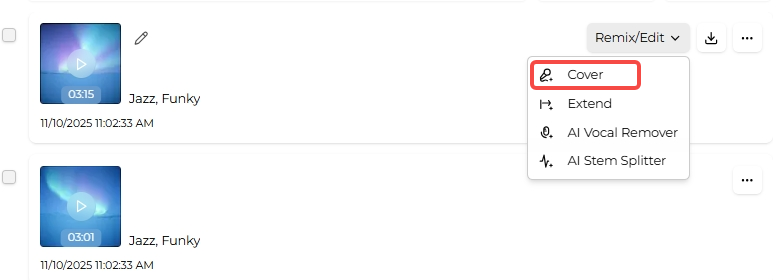
Open the AI Music Generator and choose the track you want to modify from the workspace panel. Switch to the Cover view to configure how the new version should be produced.
Set cover details
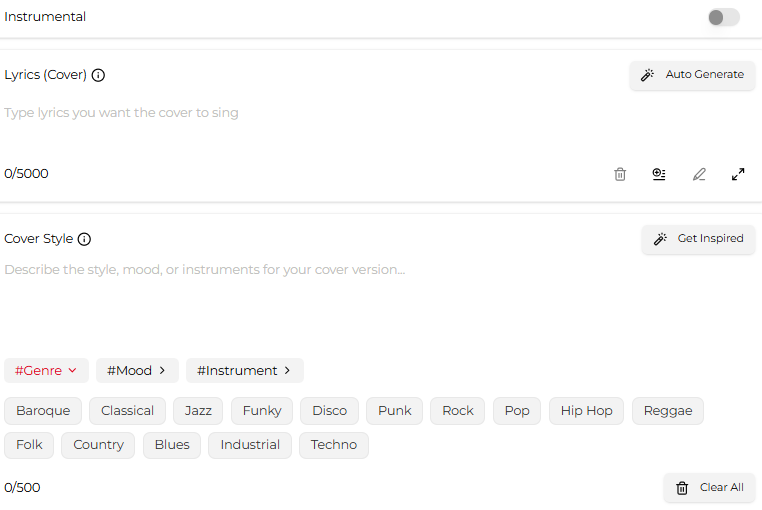
Decide whether the covered version should include vocals or stay instrumental.
Enter new lyrics if you want to change them, or reuse the original lyrics to keep them the same.
In the Cover Style field, describe the sound you want for the new version. To preserve the original feel, you can simply request the same style.
Refine with advanced options
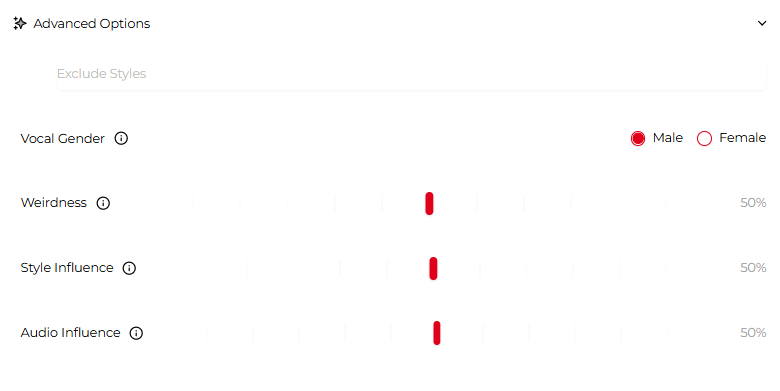
Use Advanced options to further customize the output:
- Exclude Styles: Define styles you want removed.
- Vocal Gender: Choose the vocal type for the new version.
- Weirdness: Adjust how experimental the cover sounds.
- Style Influence: Sets how closely the new version follows your style description.
- Audio Influence: Controls similarity to the original audio.
Once satisfied, click Generate and OpenMusic will create an updated version of your song.