Boss fights and raid nights
Fast, aggressive subgenres such as djent or melodic death are a common choice for tense scenes; doom suits a slower, heavier mood.
Metal subgenres, written as prompts
AI metal starts with one choice: which metal. Thrash, death, black, doom, power and djent use different tunings, tempos, drums and voices, so a prompt with only the word "metal" leaves most of those calls to chance. Name the subgenre, then spell out the parts that define it.
Write a Metal Prompt
People rarely want "metal" in general. A game developer wants a boss-fight track, a guitarist wants a backing part to solo over, an editor wants a riff that hits on a cut. Each of those points to a different subgenre, so AI metal prompts for each job start by naming the subgenre.

Fast, aggressive subgenres such as djent or melodic death are a common choice for tense scenes; doom suits a slower, heavier mood.
Ask for an instrumental in a key and tempo you can solo or riff over at home.
Thrash and power metal give a steady, driving pulse for action clips and montages.
Pick the subgenre for the voice you hear in your head, from growls to clean high vocals.
OpenMusic makes AI metal on its Metal Music Generator, which invites you to start from a subgenre and then dial in tuning, vocals, drums and tempo. The two crops below come from that generator on 2 November 2026: the prompt with its controls, then the lyrics, voice and subgenre starting points.
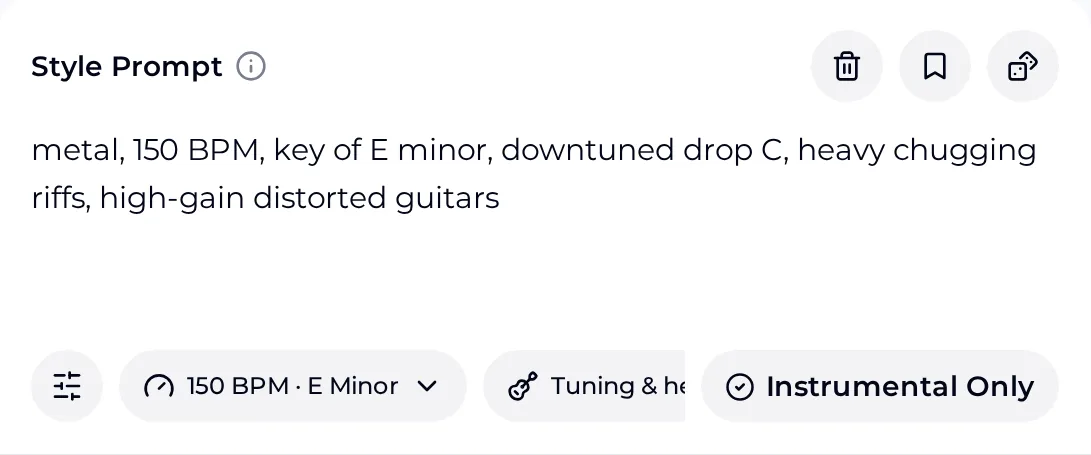
The prompt carries the subgenre words. Next to it sit a tempo and key control, a tuning and heaviness control, and an Instrumental Only switch for a track without vocals.
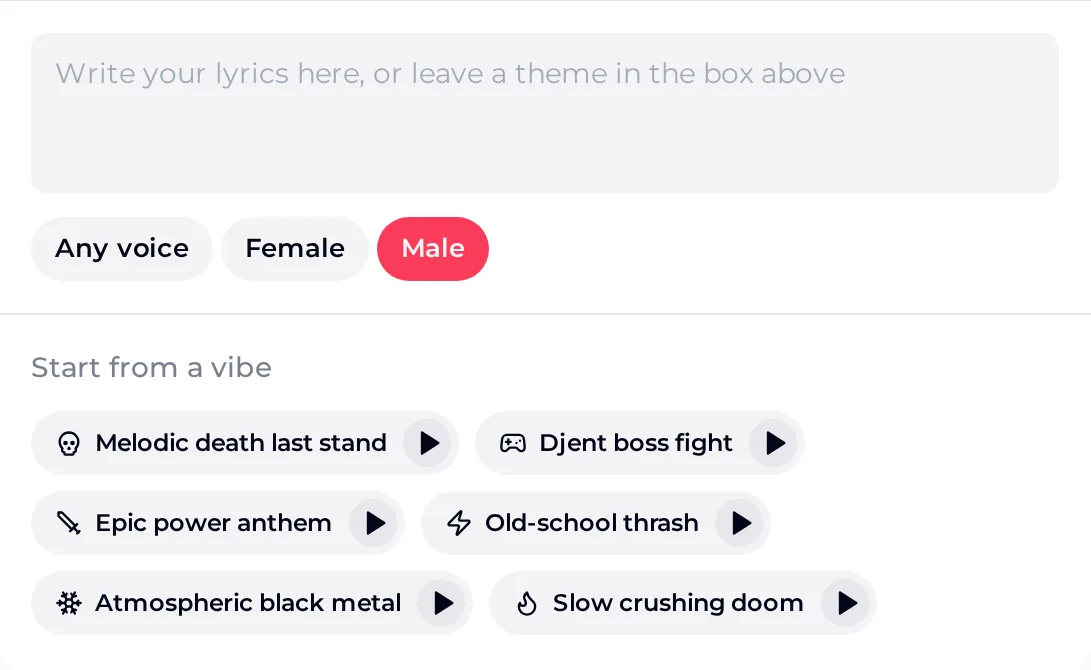
Write lyrics or leave a theme, choose Any voice, Female or Male, or begin from a subgenre starting point such as Old-school thrash or Atmospheric black metal.
Because the starting points already name subgenres, a good habit is to pick the closest one, then rewrite its prompt with your own tempo, tuning and drum words. The map in the next section gives those words for six common styles.
Each row lists words that describe a subgenre's guitars, drums and vocals, plus a sample AI metal prompt. Treat the tempos as starting points: change one word at a time and listen, because how close a result lands depends on how clearly the prompt names each part.
| Subgenre | Guitar and drum words | Vocal words | Sample prompt |
|---|---|---|---|
| Thrash | fast palm-muted riffs, galloping rhythm, snare on every beat | shouted, gritty | old-school thrash metal, 180 BPM, E minor, palm-muted riffs, fast double-time drums |
| Death | downtuned tremolo riffs, blast beats, double kick | low growls | melodic death metal, 170 BPM, D minor, harmonised lead guitars, blast beats, growled vocals |
| Black | tremolo picking, raw thin guitars, fast blast beats | high shrieks | atmospheric black metal, 160 BPM, B minor, tremolo picking, cold ambient synths, distant shrieked vocals |
| Doom | slow downtuned riffs, long sustained chords, heavy toms | clean, mournful | slow crushing doom metal, 65 BPM, drop C, fuzz guitars, sparse heavy drums, mournful clean vocals |
| Power | bright twin leads, galloping double kick, big choruses | soaring high clean | epic power metal anthem, 165 BPM, E major, twin lead guitars, double kick, soaring clean vocals |
| Djent | syncopated low chugs, extended-range guitar, tight gated tone | clean and screamed | djent progressive metal, 130 BPM, drop A, syncopated eight-string chugs, polyrhythmic drums, instrumental |
Build the prompt in passes instead of one long list. When an AI metal result misses, you can then tell whether the subgenre, the rhythm section or the vocals needs a different word, rather than rewriting everything and losing what already worked.
Start with one subgenre and one mood, such as melodic death metal, triumphant. Two subgenres in one line pull the track in two directions.
Add a BPM, a key and a tuning word such as drop C. Doom wants a low tempo; thrash and power want a fast one.
Use the guitar and drum words from the map: palm-muted, tremolo picking, blast beats, double kick or syncopated chugs.
Name the voice (growled, shrieked or clean) and choose a voice option, or switch on Instrumental Only for a backing track.
A prompt describes the track; it does not program it bar by bar. Some parts respond well to plain words, while others are better handled by listening, trying again or editing afterwards. Knowing which is which saves AI metal runs that chase a detail the prompt cannot fix.
These answers focus on getting a particular subgenre out of AI metal prompts. For everything about running the tool itself, open the Metal Music Generator and use these notes alongside it.
AI metal is metal music made with an AI music generator: you describe the track in words, and the generator returns a song with guitars, drums and, if you want them, vocals. On OpenMusic you do this on the Metal Music Generator. The more precisely you name the subgenre, tempo, tuning and vocal style, the closer the track can match the metal you have in mind.
Usually the prompt uses only the words "metal" or "heavy". Those words leave the subgenre, tuning and drum style open, so the result can drift toward a broad rock sound. Name a subgenre such as thrash or doom, add a tuning word like drop C, and describe the drums, for example blast beats or double kick. Then change one word per run so you can hear what each one does.
Yes. The Metal Music Generator has an Instrumental Only switch, so you can ask for a track with no singing, which is useful for game scenes, video edits or a part to play guitar over. Add "instrumental" to the prompt as well, so the description and the setting agree. Then listen through once to check that no short vocal sounds remain before you build on the track.
Write the vocal style into the prompt in plain words: growled or low growls for death metal, shrieked for black metal, soaring clean vocals for power metal. The generator also offers Any voice, Female and Male as voice choices. If the vocal style comes back different from what you wrote, keep the subgenre and tempo the same and try a more specific vocal word.
If one of the starting points, such as Old-school thrash or Slow crushing doom, is close to what you want, start there and edit its words. That gives you a working baseline. Start blank when you are mixing ideas the starting points do not cover, such as a djent rhythm under a doom tempo. Either way, keep a copy of the prompt that worked so you can return to it.
Pick a subgenre from the map, paste its sample prompt into the Metal Music Generator, then adjust tempo, tuning and vocals one word at a time.
Open Metal Generator