Bumper
- Length at 120 BPM
- 5–6 seconds, about 3 bars
- Sung parts
- One sung tag only
- Voice-over gap
- None; it brackets an ad break
Need a jingle that leaves room for the ad read? An AI jingle generator can sing your business name at the start, step back for a gap you fill with the voice-over, then return with a sung tag. Radio people call this a donut. Plan it in bars, label the lyric sections and trim the take to your 15, 30 or 60 second slot.
Make a Donut Jingle
A donut jingle is a short song with a hole in the middle. The singers open with the brand line, the music keeps going quietly while an announcer reads the offer, and the singers return to close with a tag. It lets one jingle carry many different ads, because only the spoken middle changes. An AI jingle generator makes the format cheap to try before you pay a studio.
"People stay sleeping on the jingle."
A poster on r/advertising
Jingles also stick around. One r/podcasting poster said their theme had been "our jingle since episode 1 (we're at episode 400 now)". That is the case for getting the format right once and reusing it.
Plan the donut in bars before you open the AI jingle generator, because the tempo decides how many seconds each sung part takes. In 4/4 time, bars = seconds × BPM ÷ 240. At 120 BPM one bar lasts two seconds, so a 30 second spot is 15 bars. Spoken word counts below assume a steady read of about 150 words a minute.
A slower tempo makes every bar longer, so the same lyric eats more of the spot. If your open line has more than about six words, give it an extra bar or pick a faster tempo. Station rules on spot length vary, so confirm the exact length with whoever airs it.
Write a two-line open and a two-line tag with section labels, set the tempo in the style line and let the AI jingle generator make two takes to compare.
Open the Jingle MakerOwn Lyrics mode is where an AI jingle generator can make the donut shape, because the section labels tell the song where to sing and where to step back. The lyric and style in the screenshot produced the Harbor Street Hardware sample in the hero.
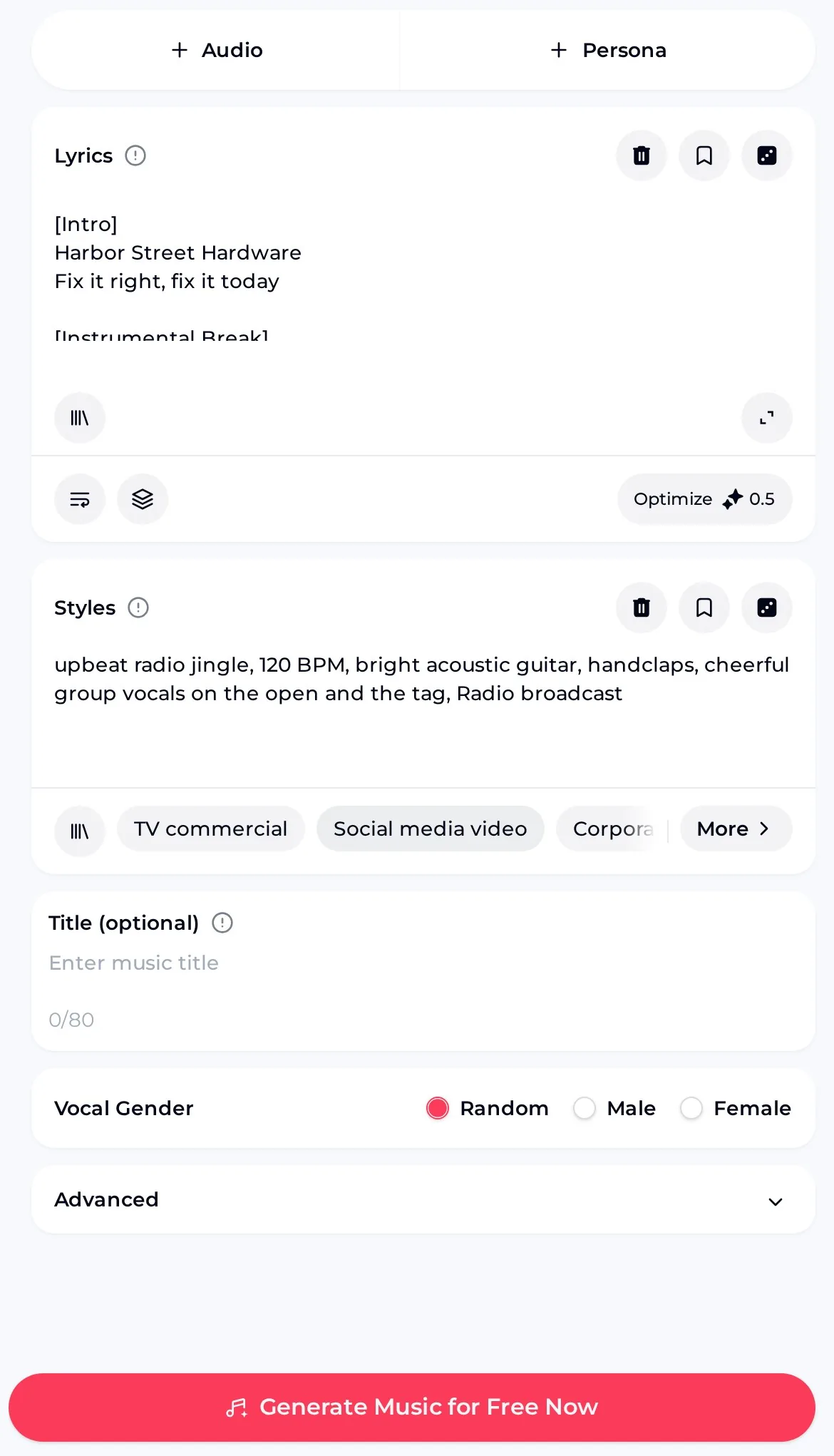
If an AI jingle generator take sings straight through the gap, make the open shorter and add a second empty break, then generate again. The prompt diff below shows the change that usually fixes it.
upbeat jingle, catchy song about a hardware store 120 BPM, group vocals on the open and the tag, steady instrumental middle for a voice-over
The AI jingle generator sample landed close to the plan, with a hole of roughly nine seconds. The style asked for 120 BPM, and the result sits close to that. Here is where the singing falls in the hero clip, timed from its sung words.
| Part | Time in the clip | What you hear |
|---|---|---|
| Sung open | 0–8 s | "Harbor Street Hardware, fix it right, fix it today" |
| Voice-over gap | About 8–17 s | Guitar, handclaps and bass with no singing |
| Sung tag | About 17–22 s | "Harbor Street Hardware, right around the bend" |
| Tail | About 22–29 s | Instrumental ending, ready to fade or cut |
A nine second hole holds about 20 spoken words, which suits a 15 or 20 second read. For a full 30 or 60 second read, generate an instrumental bed in the same style and run it under the voice-over, then drop the sung open and tag on either side in your audio editor.
Made with the AI jingle generator in Prompt mode with Instrumental Only and the same style words, so it sits under the sung parts without clashing.
Sample · Harbor Street radio bedUse the AI jingle generator for the donut with your business name, then an instrumental bed in the same style for reads that need more room.
Start Your JingleThe tool gives you the music and the sung lines; the timing, the read and the clearance are still your job. Open each limit to see what to do instead.
AI jingle generator takes come out at their own length. Trim the tail and add a short fade in any audio editor so the spot ends exactly on time.
Record the read yourself or with an announcer, then place it in the gap. Keep the music a little quieter under the voice.
For a TV or social spot, cut the picture to the music, or trim the music to the picture in your video editor.
Before airing, confirm that the business name, slogan and any place names are yours to use in an ad.
One r/podcasting reply put it bluntly: "you're better off not having any sort of intro than trying to use AI. People can tell". Another poster said an intro jingle "got flagged this last week after using it for months". Listen critically, keep a clean take and keep your licence file handy.
Most weak donuts from an AI jingle generator fail on the words, not the music. Short lines, a name that is easy to sing and a clear request for the gap fix most of them.
Put the name first. Start the open with the business name so it lands before anyone tunes out.
Keep each line short. Four to six words per line keeps the open inside its bars at 120 BPM.
Spell names the way they sound. If an AI jingle generator take mispronounces a name, write it phonetically in the lyric box.
Match the bed to the donut. Reuse the exact style words so the bed and the sung parts share tempo and instruments.
Save the AI jingle generator lyric and style line together. When the next ad needs a new read, you change only the voice-over, and the jingle keeps sounding like the same brand.
Yes. You can use the AI jingle generator free: you get 30 free credits a year after a quick sign-up, and each generation costs 2 credits, so that covers 15 generations. Each generation gives two takes, which is useful for a donut because you can keep the one with the cleaner gap. If a generation fails, the credits are usually returned automatically. Songs you made on the free plan can be downloaded once you upgrade to any paid plan.
Monthly and annual plans include commercial rights, within the scope of the Commercial License. Monthly plans unlock the licence certificate for 5 credits per song, and annual plans include it at no extra charge. Pay Once credits can also unlock the licence at 5 credits per song. Songs made on the free plan do not need to be remade; you can license them later with credits.
No. In the AI jingle generator you can describe the shape with section labels and a tempo, but the take comes out at its own length. The Harbor Street sample ran just under 30 seconds. Plan the open and tag in bars, generate, then trim the tail and fade it in an audio editor so the spot ends on the exact second the station needs.
Paid plans can download MP3, WAV and FLAC, including songs made on the free plan once you upgrade. For radio, a WAV or FLAC file gives the station or your editor a clean master to work from, while MP3 is handy for sending a quick preview to the business owner for approval. Download the donut and the bed as a matching pair.
Usually, if the name is common English. Unusual names, initials and invented spellings can come out wrong. Write the name the way it sounds, add hyphens between syllables if needed, and generate again. Keep the name early in the open and repeat it in the tag, so even a short bumper says it once clearly. Listen to both takes, because one often handles the name better than the other.
Use a donut when the offer changes often, because only the spoken middle needs rewriting. Use a fully sung jingle when the message stays the same for months and you want it to work as a song on its own. Many local advertisers keep both: a donut for weekly offers and a short sung bumper to close every ad. Both can come from the same lyric and style line in the AI jingle generator.
Write a short open and tag, ask for a gap in the middle and let the AI jingle generator shape a donut jingle for your next radio spot.