Text in, songs out
The panel drafts music from a Prompt on OpenMusic. Write mood, genre, and purpose in one sentence so the first listen has a clear job you can keep or throw away.
Prompt-to-music in your browser
An AI Music App on OpenMusic turns a one-line Prompt, or your own words in Own Lyrics, into a few takes you can compare, since Number of Songs to Generate defaults to 2. It runs in a desktop or phone browser with the same panel.
Ready to try it? Open the AI Music Generator and write your first Prompt.
Here the phrase means one browser panel that drafts songs from text. You open it like any online music app, sign in, and start with a sentence.
The panel drafts music from a Prompt on OpenMusic. Write mood, genre, and purpose in one sentence so the first listen has a clear job you can keep or throw away.
Use the Prompt tab for a described track, or switch to Own Lyrics to paste your words and add a Styles line. Instrumental Only keeps a Prompt take wordless when it sits under voiceover.
Number of Songs to Generate defaults to 2, so a run gives you a few takes to weigh. Listen through every ending at matched volume and keep the one that fits.
Reach for this online music app when a quick sketch beats opening a blank project. Typical jobs are short:
Each job stays simple to judge: one brief, a few files, one keep. Because the panel works as a browser-based music app, it also opens in a phone browser, so a short brief and a careful listen are all a session needs.
Name mood, genre, and purpose in the Prompt. One sentence is enough when every word earns its place.
Stay on Prompt and switch on Instrumental Only for a bed, or move to Own Lyrics when you have words to sing.
Play each file to the end at the same volume, and note which Prompt words moved the arrangement.
Save the stronger take with the date and mode in its name so later revisions of the same idea stay easy to sort.
Want a starting point? Try one short Prompt such as a warm acoustic loop for a cooking clip, compare the takes, and change a single word before your next run. Small, deliberate changes teach you more about the panel than rewriting the whole brief each time, and they keep your credits working on ideas you actually want to hear.
The screenshot shows the Own Lyrics tab: the Audio and Persona buttons on top, then the Lyrics box with its Optimize button. The Styles box sits right below it on the live panel.
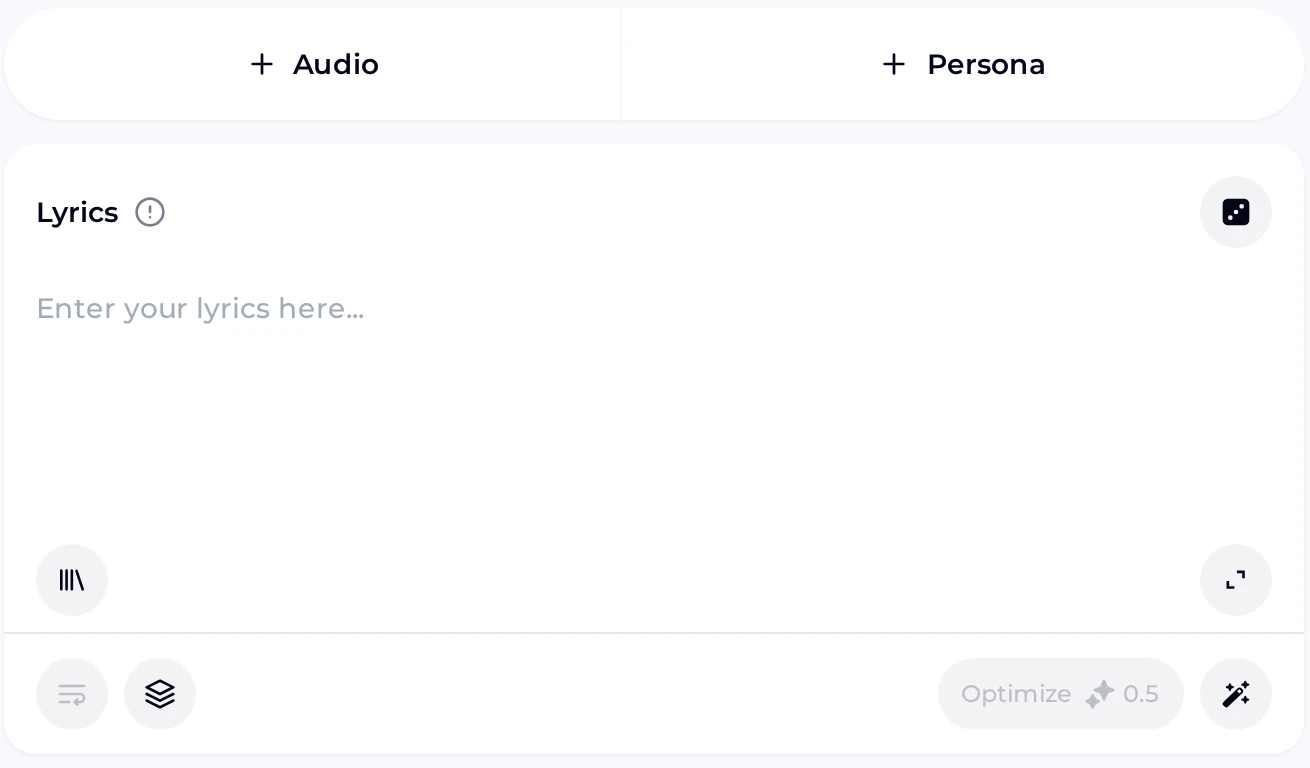
Paste a hook or verse with clear line breaks so the sung take follows your shape.
Both sit above the Lyrics box; the Prompt tab keeps the Instrumental Only switch for wordless beds.
Two example tracks made on OpenMusic. Listen for vocal clarity, the pace of the opening bars, and how each ending lands. Play them at the same volume, as you would your own takes. Then write your own brief in the same spirit: one mood, one genre, and one clear purpose, so the takes you get back have a fair target to meet and an obvious winner.
A calm listen: check the vocal line and how the last bar resolves.
A second track to compare feel and pacing side by side with Example 1.
It is the AI Music Generator panel, used as a music app in your browser. You write a Prompt with mood, genre, and purpose, or paste words into Own Lyrics with a Styles line, and the panel drafts a few takes, since Number of Songs to Generate defaults to 2. Listen to each, keep the one that fits, and adjust a single detail for the next run. Everything happens in one panel, so you can judge real audio instead of setting up a project first.
Yes. The free plan includes 30 credits a year after sign-up, which covers 15 generations at 2 credits per song. Free users can download a limited number of songs, while paid plans can download MP3, WAV, and FLAC, including songs made on the free plan. You can also buy credits once with Pay Once if you need more without changing plans. Start with a short, specific Prompt so your first takes tell you quickly whether the result suits the job you have in mind.
Yes. The panel opens in a phone browser as well as on a desktop, with the same Prompt and Own Lyrics tabs and the same Number of Songs to Generate setting. When you check music on your phone, headphones help you judge vocals, and a quiet room makes endings easier to compare. Keep briefs short on a small screen, and name the purpose clearly, for example a calm loop for a cooking clip, so every take has a fair target to meet.
Yes. Switch to the Own Lyrics tab, paste a hook or verse into the Lyrics box, and describe the sound in the Styles box. Title is optional, and Vocal Gender offers Random, Male, or Female. Keep lines short with clear breaks so the sung take follows your shape. If you only need a wordless bed, go back to the Prompt tab and switch on Instrumental Only instead.
Songs you make on OpenMusic can be used within the scope of the Commercial License, and monthly plans include it as well as yearly ones. A Commercial License certificate costs 5 credits per song on monthly plans and Pay Once, while yearly plans add no extra certificate credits. Free-plan downloads are limited, so check your plan before you deliver a track to a client. Keep the export labelled with its date and mode so you always know which take you licensed.
Write one clear job per run: mood, genre, and purpose in a single Prompt. Listen to every take all the way through, including the ending, before you change anything. Then change only one detail, such as the tempo word or the lead instrument, so you learn which words moved the track. Inspiration chips like Country, Folk, or Rock can nudge the style once the core sentence works. A short, specific brief almost always beats a long list of adjectives.
Write one clear Prompt, generate a few takes, compare every ending, and keep the track that suits your project best.
Open Music App