Mistake: training on songs with loud music under the voice.
Fix: use dry vocal takes, or start with Separate vocals.
Most people searching for an AI music voice generator want songs sung in a voice they choose. The most personal choice is your own voice.
On OpenMusic, the AI Singing Voice Generator trains a voice model from clean vocals you record or upload. Your AI music voice generator results depend on that training audio.

Voice training suits singers who want their own sound on new songs and covers.
The search term covers several wishes. Some people want a sung vocal for lyrics, some want a cover, and some want a talking voice. The lists show where an AI music voice generator with a trained model fits and where another tool fits better.
You give the voice a name, add training audio, set the gender and start training.
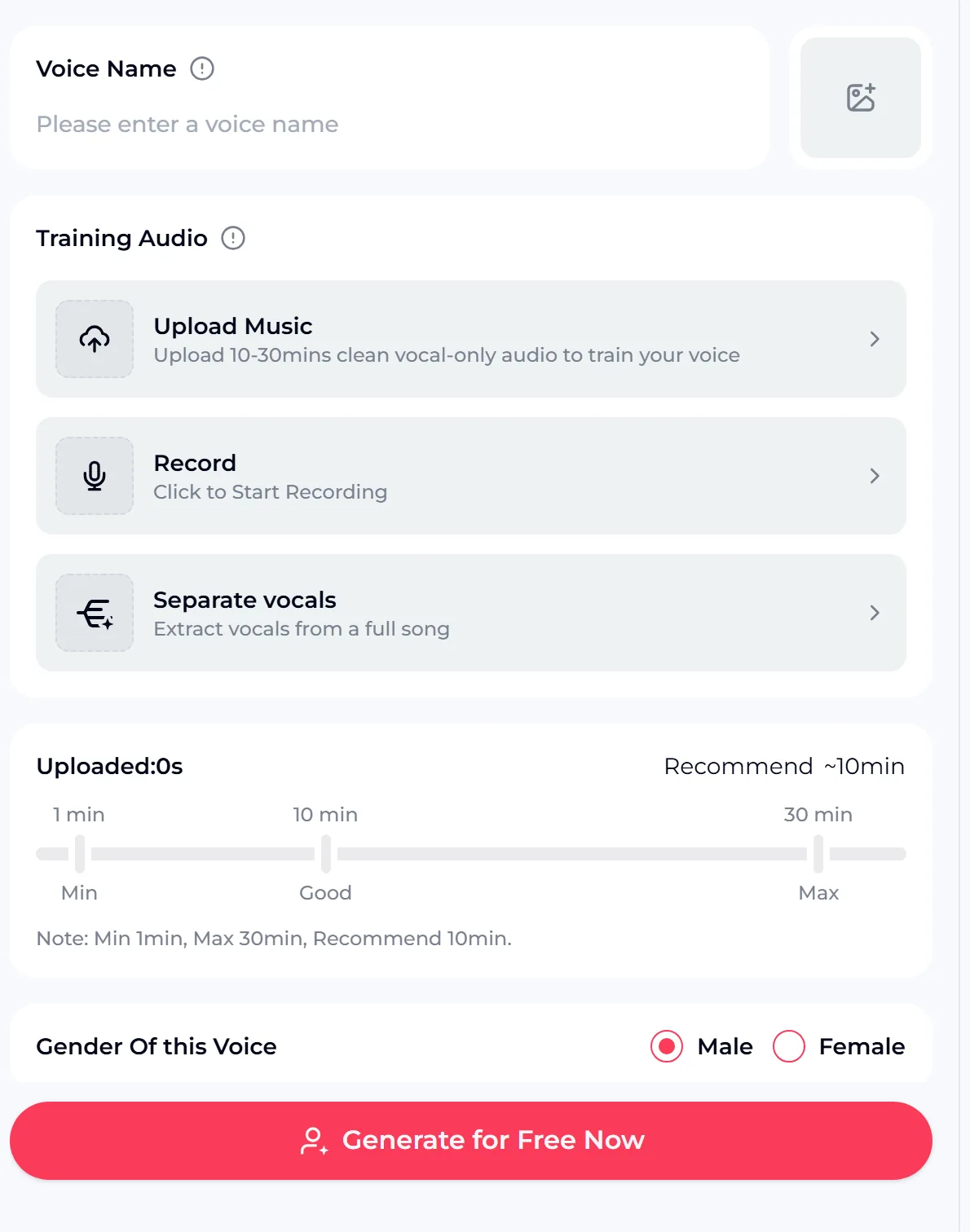
Every field of this AI music voice generator panel is listed here. The duration bar fills as you add audio, so you can see when you reach the recommended length.
Name your voice, add clean vocals by upload or recording, and start training in the browser with free credits after a quick sign-up.
Upload is best when you already have clean takes; recording suits a fresh start.
The panel offers three sources for training audio. Pick the one that matches the recordings you already have. You can upload up to 5 files, and about one minute or more each is recommended.
| Source | What you give it | Best when |
|---|---|---|
| Upload Music | Clean vocal-only audio files | You have dry vocal takes from earlier sessions |
| Record | Singing captured in the browser | You have a quiet room and a decent microphone |
| Separate vocals | A full song with your singing | Your voice only exists in finished mixes |
Training also isolates the vocals from what you add. Even so, starting from vocals without music or background noise gives the model the clearest picture of your voice.
Train once, then reuse the model for every song you make.
An AI music voice generator is most useful when the model is ready to reuse. The last step happens in other OpenMusic tools that read your trained voice from the My Voice tab.
To sing over an existing track, open the AI Song Cover Generator and choose your model. The AI Song Singer also lists trained voices under My Voice.
The model learns what you feed it, so clean input matters more than length.
Most weak results from an AI music voice generator trace back to the training audio. These are common problems and simple fixes before you upload or record.

Mistake: training on songs with loud music under the voice.
Fix: use dry vocal takes, or start with Separate vocals.
Mistake: one short take of a single song.
Fix: sing several songs with high, low, soft and loud parts.
Mistake: recording near a fan or a busy street.
Fix: pick a quiet room and keep the same distance from the microphone.
Mistake: mixing your voice with other singers.
Fix: only add audio where you sing alone.
A trained model is one route; ready-made voices and full songs are the others.
An AI music voice generator search does not always mean training. Use these signs to pick the right OpenMusic tool for your goal.

You can start the AI music voice generator with free credits after a quick sign-up.
Each AI music voice generator run shows its credit cost on the button before you press it. Keep these points in mind when you plan your songs and covers.
Answers about training audio, voices and use.
The AI music voice generator panel accepts between 1 and 30 minutes of vocals and recommends about 10 minutes. The Upload Music option asks for 10 to 30 minutes of clean vocal-only audio. You can upload up to 5 files or record in the browser. More variety helps more than raw length, so sing different songs with high and low notes, soft verses and loud choruses. Keep every take free of music, echo and background noise so the model hears only your voice.
Searches often pair this tool with famous singers, but the training panel is built for voices you have the right to use, such as your own. Train on recordings of yourself or of a singer who has agreed to it. Do not upload a celebrity's songs to copy their voice. If you want a ready-made sound instead, the AI Song Singer offers voice models you can pick without training. Describe the style you like, rather than naming a real artist, when you make songs.
No. The voices you train in the AI music voice generator are singing voices for music. The model learns from sung vocals and is then used to sing covers or lyrics in OpenMusic tools such as the AI Song Cover Generator and the AI Song Singer. If you need narration, voiceover or a talking character, a speech tool is a better choice. If you want an AI voice music generator for a song from typed words, write lyrics in the AI Music Generator, which creates the music and the sung vocal together.
This AI music voice generator starts with free credits. You can begin after a quick sign-up, and the credit cost of each run is shown on the button before you press it. Songs you made on the free plan can be downloaded once you upgrade to any paid plan. Songs download as MP3, and you can use them within the scope of the Commercial License. Since an AI voice generator for music needs clean vocals to train, prepare your recordings first so your free credits go into a model worth keeping.
Upload or record clean vocals, name your voice and train an AI music voice generator model you can reuse for songs and covers, with free credits after a quick sign-up.